
3D Default Resource Pack Wiki

3D Default Resource Pack Wiki & Guide
wiki.9minecraft.net/3d-default-resource-pack/
Redraws select vanilla items and blocks with three-dimensional models, including rails, bookshelf, potions, honey bottles, and dragon's breath.
Guides
Step-by-step, in-game.
How to Fix Models That Look Flat or Wrong After InstallingHow to Make Vanilla Items Look 3D Without Changing GameplayHow to Tell Which Blocks and Items the Pack Actually RedrawsHow to Use the Pack on a Server or With Other Resource Packs
Items
 Honey Bottle
 Potion
Blocks
 Activator Rail
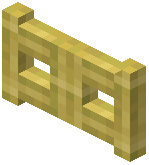 Bamboo Fence Gate
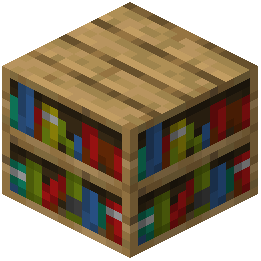 Bookshelf
 Detector Rail
 Powered Rail
What this pack changes
Every texture group the pack replaces, counted from the pack itself.
| Area | Textures replaced |
|---|---|
| Blocks | 318 |
| Items | 103 |
| Mobs & entities | 2 |
Pack format 35–97 (Minecraft 1.21.2–1.21.9)423 texture files in total
Extra features
Custom entity models (OptiFine/CEM)
Custom block/item models
Frequently asked questions
How do I actually turn on the 3D models after installing the pack?
Just enable the resource pack in Options > Resource Packs and move it to the top of the selected list. The models apply automatically to the supported items and blocks — there's no config screen or toggle to flip.
Which items and blocks does this pack make 3D?
It redraws a specific set: rails (including powered, detector, and activator rails), bamboo fence gates, bookshelves, potions, honey bottles, and  dragon's breath. Anything not on that list stays vanilla, so don't expect the whole game to change.
dragon's breath. Anything not on that list stays vanilla, so don't expect the whole game to change.Why do my rails still look flat?
Make sure the pack is actually enabled and sitting above any other pack that also touches  rail models. If another pack overrides the same models, whichever sits higher in the list wins.
rail models. If another pack overrides the same models, whichever sits higher in the list wins.Does this pack change gameplay, recipes, or hitboxes?
No. It's purely visual — only the models and textures change, so block behavior, crafting, and collision stay exactly the same as vanilla.
See all 17 3D Default questions ›
Related mods
Other wikis you may find useful.
 Default Dark Mode
 Default Options Mod
 Default World Type Mod
 Default Skill Trees Mod
 Better Default Biomes Mod
 Default Server Properties Mod