Guides
Step-by-step, in-game.
How to Add Upgrades to a BackpackUpgrade Slots Every backpack has upgrade slots in its interface. Open the backpack, then place an upgrade item into…How to Automate Pickup, Deposit and RestockPulling Items In Install a Pickup Upgrade in the backpack to collect drops around you. The Advanced Pickup Upgrade…How to Change Backpack Color and Manage Its ContentsChanging the Appearance Open the backpack interface and look for the color controls. From there you can recolor the…How to Craft and Wear Your First BackpackCrafting the Backpack Start with the basic Backpack . Its recipe is registered as…How to Increase Backpack Storage CapacityStack Upgrades Storage growth comes from Stack Upgrade items. The line runs Stack Upgrade Starter Tier , Stack…How to Use Processing and Utility UpgradesFurnace-Type Upgrades Smelting Upgrade and Auto-smelting Upgrade cook items as if in a furnace. Blasting Upgrade and…
Recipes
Every recipe the mod adds, grouped by how it is made.
Crafting · 47sophisticatedcore:upgrade_next_tier · 22sophisticatedbackpacks:backpack_upgrade · 5sophisticatedbackpacks:basic_backpack · 1sophisticatedbackpacks:smithing_backpack_upgrade · 1
Items
65 items · showing 24. Browse all →
 Advanced Alchemy Upgrade
 Advanced Compacting Upgrade
 Advanced Deposit Upgrade
 Advanced Feeding upgrade
 Advanced Filter Upgrade
 Advanced Jukebox Upgrade
 Advanced Magnet Upgrade
 Advanced Mob Catcher Upgrade
 Advanced Pickup Upgrade
 Advanced Pump Upgrade
 Advanced Refill Upgrade
 Advanced Restock Upgrade
 Advanced Tool Swapper Upgrade
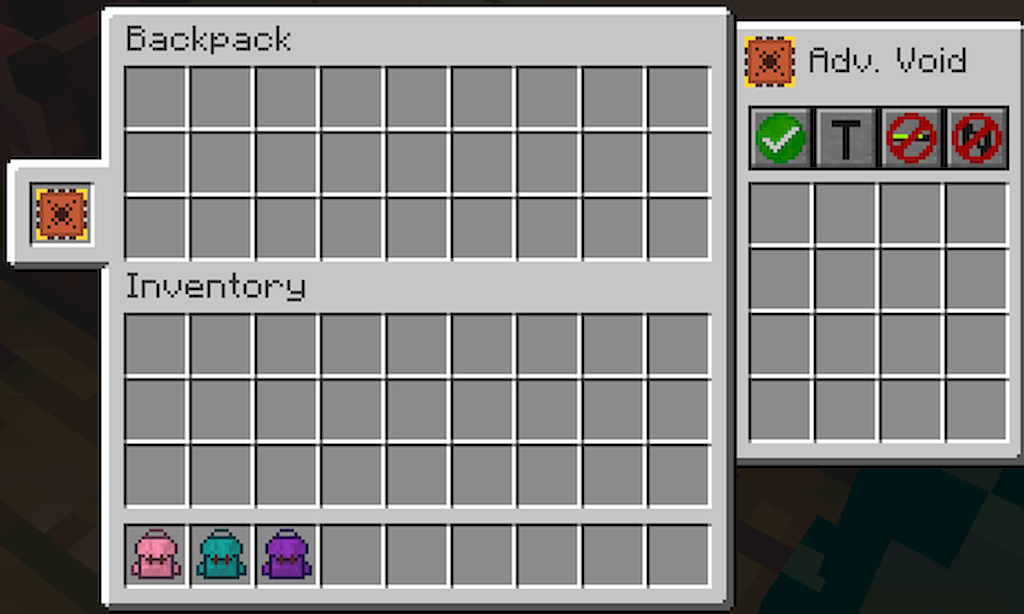
 Advanced Void Upgrade
 Alchemy Upgrade
 Anvil Upgrade
 Auto-blasting Upgrade
 Auto-smelting Upgrade
 Auto-smoking Upgrade
 Battery Upgrade
 Blasting Upgrade
 Compacting Upgrade
 Crafting Upgrade
 Deposit Upgrade
Blocks
 Backpack
 Copper Backpack
 Diamond Backpack
 Gold Backpack
 Iron Backpack
 Netherite Backpack
Configuration
Every setting in the mod config file, with what it changes.
| Option | What it does |
|---|---|
addLoot | Add Loot |
advancedAlchemyUpgrade | Advanced Alchemy Upgrade |
advancedCompactingUpgrade | Advanced Compacting Upgrade |
advancedDepositUpgrade | Advanced Deposit Upgrade |
advancedFeedingUpgrade | Advanced Feeding Upgrade |
advancedFilterUpgrade | Advanced Filter Upgrade |
advancedJukeboxUpgrade | Advanced Jukebox Upgrade |
advancedMagnetUpgrade | Advanced Magnet Upgrade |
advancedMaxSlotCost | Advanced Max Slot Cost |
advancedPickupUpgrade | Advanced Pickup Upgrade |
advancedRefillUpgrade | Advanced Refill Upgrade |
advancedRestockUpgrade | Advanced Restock Upgrade |
advancedVoidUpgrade | Advanced Void Upgrade |
alchemyUpgrade | Alchemy Upgrade |
voidAlwaysEnabled | Allow Direct Voiding |
dropToFakePlayers | Allow Fake Player Drops |
allowOpeningOtherPlayerBackpacks | Allow Opening Other Players' Backpacks |
animalMultiplier | Animal Slot Cost Multiplier |
autoBlastingUpgrade | Auto-Blasting Upgrade |
autoSmeltingUpgrade | Auto-Smelting Upgrade |
autoSmokingUpgrade | Auto-Smoking Upgrade |
basicMaxSlotCost | Basic Max Slot Cost |
batteryUpgrade | Battery Upgrade |
blastingUpgrade | Blasting Upgrade |
Frequently asked questions
How do I craft a basic Backpack?
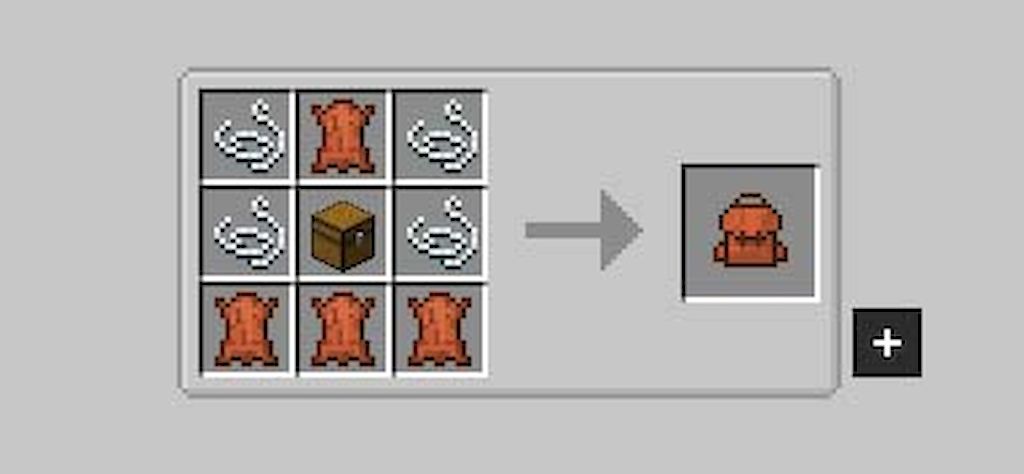
The Backpack is made using the sophisticatedbackpacks:basic_backpack recipe, which is a shaped crafting recipe. Place the required materials in a crafting table grid to obtain it.
How do I upgrade my Backpack to a higher tier?
Use the sophisticatedbackpacks:backpack_upgrade recipe type, which upgrades a backpack into the next tier (e.g., Backpack to Iron Backpack, Iron to Gold, Gold to Diamond, Diamond to Netherite). The Netherite Backpack is obtained via the sophisticatedbackpacks:smithing_backpack_upgrade recipe.
How do I add upgrades to my backpack?
Craft an Upgrade Base, then craft specific upgrades like the Pickup Upgrade, Magnet Upgrade, or Crafting Upgrade using shaped recipes. Upgrades are inserted into the backpack's upgrade slots through its GUI.
How do I open my backpack?
Equip the backpack in your back slot or hold it, then use the configured keybind to open its inventory GUI. From there you can access storage, upgrade slots, and settings.
How do I wear a backpack on my back?
Place the backpack into the dedicated back slot in your inventory (curios-style slot). Once equipped, it renders on your character and can be opened with the backpack keybind.
How do I increase my backpack's storage capacity?
Apply Stack Upgrades to increase how many items fit per slot. Stack Upgrade Starter Tier, Tier 1 through Tier 4, and Stack Upgrade Omega Tier progressively raise stack limits, and Stack Downgrade Tier 1-3 reduce them if needed.
How do I convert a Stack Upgrade to a higher tier?
Use the sophisticatedcore:upgrade_next_tier recipe type, which converts a Stack Upgrade of one tier into the next (e.g., Tier 1 to Tier 2). Conversion recipes exist from Starter Tier up through Tier 4, and Tier 1/2/3 to higher tiers.
What does the Crafting Upgrade do?
The Crafting Upgrade adds a crafting grid to the backpack's GUI, letting you craft items directly from stored materials. Craft it via a shaped recipe and insert it into an upgrade slot.
What does the Magnet Upgrade do?
The Magnet Upgrade pulls nearby dropped items into the backpack automatically. The Advanced Magnet Upgrade extends this with greater range or filtering options.
What does the Inception Upgrade do?
The Inception Upgrade allows a backpack to be stored inside another backpack, enabling nested storage. It is crafted via a shaped recipe and placed in an upgrade slot.
What does the Everlasting Upgrade do?
The Everlasting Upgrade prevents the backpack from being destroyed on death or similar loss events. Craft it and insert it into an upgrade slot to apply the effect.
What does the Tank Upgrade do?
The Tank Upgrade adds fluid storage to the backpack, allowing it to hold liquids. It is crafted via a shaped recipe and placed in an upgrade slot.
You May Also Like
Wikis that share the most with this one
Wikis on the same theme: backpack
More mod wikis on the site
The most downloaded mods that have a wiki here
A few wikis from each of the other kinds
Gallery
12 images from the Sophisticated Backpacks Mod page.