
Als Boss Rush X Fresh Animations Resource Pack Wiki

Als Boss Rush X Fresh Animations Resource Pack Wiki & Guide
wiki.9minecraft.net/als-boss-rush-x-fresh-animations-resource-pack/
Updates dragon egg visuals with fresh animations.
Guides
Step-by-step, in-game.
Customize Guardian Appearance While Keeping Fresh AnimationsEnsure Guardian Models Display Correctly with Fresh AnimationsPrepare for an Elder Guardian Fight with Enhanced VisualsTroubleshoot Mismatched or Broken Guardian Textures
Blocks
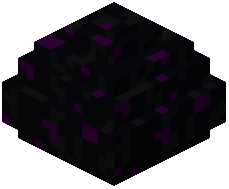 Dragon Egg
What this pack changes
Every texture group the pack replaces, counted from the pack itself.
| Area | Textures replaced |
|---|---|
| GUI & menus | 23 |
| Mobs & entities | 22 |
| Font | 5 |
| Blocks | 1 |
| Items | 1 |
Pack format 55–99 (Minecraft 1.21.5–1.21.9)52 texture files in total
Extra features
Custom entity models (OptiFine/CEM)
Custom font
Custom block/item models
Reworked GUI
Frequently asked questions
Do I need both AL's Boss Rush and Fresh Animations installed for this pack to work?
Yes, this is a compatibility patch—you must have both AL's Boss Rush and Fresh Animations installed in order for the Guardian models to display correctly. The patch bridges the two mods and won't function without both parent mods active.
Why do my Guardians look broken or have missing textures?
This usually means the resource pack didn't load after Fresh Animations, or there's a conflict in your resource pack load order. Make sure this patch is positioned *after* Fresh Animations in your pack list so it can override the Guardian models properly.
Can I use this with other Guardian-modifying resource packs?
No—other Guardian packs will conflict with this one since they all modify the same model files. Choose either this patch or another Guardian pack, but not both.
How do I know if the Elder Guardian fight is using the Fresh Animations version?
Load into a world with the pack active and summon or encounter an Elder Guardian—you should see smooth, fluid animations that match Fresh Animations' style rather than stiff or mismatched movement. If animations look jerky or textures are wrong, check your load order.
Will this pack affect performance compared to using Fresh Animations alone?
No noticeable performance impact—this is just a resource pack that remodels Guardians to match Fresh Animations' system, so it uses the same rendering pipeline and won't slow you down.
What if I want to customize Guardian colors or appearance?
You can edit the texture files in this pack's folder, but be careful not to break the Fresh Animations rig—stick to recoloring existing textures rather than changing the model structure itself.
Does this work in multiplayer?
Yes, as long as you have the pack installed on your client. Other players don't need it—they'll see Guardians normally while you see the Fresh Animations version.
Why do Guardians look different in water versus on land?
Fresh Animations includes special pose and animation adjustments for underwater creatures, so Guardians will animate differently depending on their environment—this is intentional and part of the Fresh Animations design.
Can I use this patch with Optifine or other rendering mods?
Yes, this pack is compatible with most rendering mods like Optifine since it only modifies Guardian models and textures, not rendering code. Just make sure your load order puts this patch after Fresh Animations.
What should I do if Guardians still look wrong after reinstalling the pack?
Clear your resource pack cache (delete the 'shaderpacks' and 'resourcepacks' cache folders), restart Minecraft, and reload the pack in the correct order—this usually fixes texture or model glitches that persist after updates.
You May Also Like
Wikis that share the most with this one
 Fresh Animations
 Als Boss Rush Resource Pack
 Fresh Animations Details Resource Pack
 Fresh Animations Objects Resource Pack
 Fresh Animations Emissive Resource Pack
 Whimscape x Fresh Animations Resource PackExcalibur Fresh Animations Patch Resource PackProgrammer Art x Fresh Animations Resource Pack
 Fresh Animations: Player Extension Resource PackHorse Armor N Stuff X Fresh Animations Resource Pack
 Fresh Animations Player Extension 9minecraft Resource Pack
 Mobs Refreshed + Fresh Animations 9minecraft Resource Pack
Wikis on the same theme: dragon
 3D Default Resource PackLiving Dragon Resource PackEnder Dragon Wings Resource PackEnder Dragon Reborn Resource Pack
 Ender Dragon Revamp Resource PackRethoughted Dragon Egg Resource Pack
 Geforcelegends 3D Default Resource Pack
 Ender Dragon Revamp 9minecraft Resource PackIce & Fire Dragonsteel Weaponry Resource Pack
 Epic AcgFunitemsMobosses
More resource pack wikis on the site
 Als Armor Stands Revamped Resource PackAlmost Vanilla Potions Resource PackAll Tropical Fish Collection Resource Pack
 Alagard Font Resource Pack
 AlacrityAL’s Piglins Revamped Resource Pack
 Aimz – Tiny Crosshair Resource Pack
 Aimz – Throne and Liberty Crosshair Resource Pack
 Aimz – Sniper Crosshair Resource Pack
 Aimz – PVP Crosshair Resource Pack
 Aimz – Lunar Orbit PVP Crosshair Resource Pack
 Aimz – Lunar Arrow Crosshair Resource Pack
The most downloaded mods that have a wiki here
 AppleSkin
 JourneyMap Mod
 Placebo
 Waystones
 Nature's Compass Mod
 Enchantment Descriptions Mod
 Patchouli Mod
 Jade Mod
 Quark Mod
 Balm Mod
A few wikis from each of the other kinds