
Paginated Advancements Mod Wiki

Paginated Advancements Mod Wiki & Guide
wiki.9minecraft.net/paginated-advancements-mod/
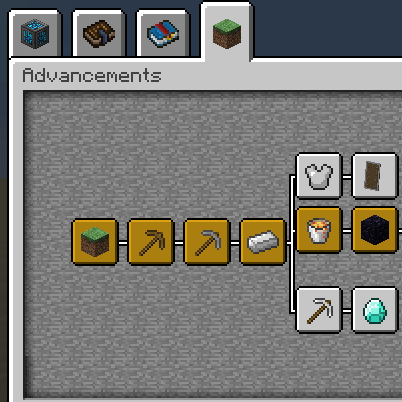
Paginated Advancements Mod revamps the appearance of the achievements menu by adding various useful features.
Guides
Step-by-step, in-game.
How to Add Custom Advancement Frames with a Data PackPaginated Advancements supports custom frame styles and colors, which you can supply through a data pack. This lets…How to Adjust Tab Spacing, Background Fading, and LayoutPaginated Advancements exposes several visual tweaks so you can make the screen match your preferences or your…How to Open and Navigate the Paginated Advancements ScreenThe Paginated Advancements mod replaces the vanilla advancements window with a much larger, page-based interface.…How to Pin Advancement Tabs So You Don't Lose TrackPinning is the headline feature of Paginated Advancements. It keeps the tabs you care about visible at the top of the…
Configuration
Every setting in the mod config file, with what it changes.
| Option | What it does |
|---|---|
pinning_enabled | Enable pinning of advancement tabs |
fade_out_on_advancement_hover | Fade the background slightly gray when hovering over an advancement |
pinned_tabs | List of pinned Tabs (root advancement identifier) |
max_criterion_entries | Max displayed advancement criterion entries |
save_last_selected_tab | Save and restore the last selected tab |
show_advancement_id_in_debug_tooltip | Show advancement ID in debug tooltip |
show_debug_info | Show debug info on advancement hover |
spacing_between_horizontal_tabs | Spacing between horizontal tabs |
spacing_between_pinned_tabs | Spacing between pinned tabs |
last_selected_tab | The identifier of the last selected tab |
Frequently asked questions
How do I open the Paginated Advancements screen?
Open the advancements menu the same way you normally would, such as from the pause menu or with the advancements keybind. The mod replaces the vanilla screen with its larger paginated layout automatically, so no extra key is needed.
Why are my advancement tabs split across multiple pages?
The mod separates tabs into individual pages to stop them from overlapping or disappearing when you have a lot of them. You move between pages using the page controls on the screen rather than scrolling one giant tab bar.
How do I pin an advancement tab?
Click the pin control on the tab you want to keep visible, and it stays accessible regardless of which page you're viewing. Pinning is meant for the tabs you're actively working on so you can pick up where you left off.
How do I unpin a tab I no longer need?
Click the same pin control on the tab again to toggle it off. The tab then returns to its normal position in the page layout.
See all 10 Paginated Advancements questions ›
Related mods
Other wikis you may find useful.
 Clickable Advancements Mod
 Better Advancements 9minecraft Mod
 PackagedAvaritia Mod
 Packages Mod
 Packed Up Mod
 Packet Fixer Mod