
Net Music Wiki

Net Music Wiki & Guide
wiki.9minecraft.net/net-music-mod/
Adds a music system with a computer, CD burner, music CDs, and a portable music player with backpack storage.
Guides
Step-by-step, in-game.
Fixing the Net Music Mod When Nothing WorksHow to Play Music CDs in the Music PlayerHow to Set Up the Computer and Burn Your First Music CDHow to Store and Carry Your Music Player with the Backpack
Recipes
Every recipe the mod adds, grouped by how it is made.
Items
Blocks
Configuration
Every setting in the mod config file, with what it changes.
| Option | What it does |
|---|---|
enable_maid_lyricsEnable Maid Lyrics | Whether to enable lyrics display for the maid |
enable_netmusic_cd_generationEnable NetMusic CD Generation | Whether NetMusic CDs can generate inside mob backpacks |
enable_player_lyricsEnable Player Lyrics | Whether to enable lyrics display in the music player |
enable_stereoEnable Stereo | Whether stereo playback is enabled |
enable_vip_netmusic_cd_generationEnable VIP NetMusic CD Generation | Whether VIP NetMusic CDs can generate inside mob backpacks (VIP CDs cannot be played) |
general | General Settings |
original_maid_lyrics_colorOriginal Maid Lyrics Color | The color of the original lyrics for the maid, in #ARGB format |
original_player_lyrics_colorOriginal Player Lyrics Color | The color of the original lyrics in the music player, in #ARGB format |
proxy_addressProxy Address | Proxy Address, such as 127.0.0.1:1080, empty is no proxy |
proxy_typeProxy Type | Proxy Type, http and socks are supported |
sophisticatedbackpacks | SophisticatedBackpacks Compatibility |
translated_maid_lyrics_colorTranslated Maid Lyrics Color | The color of the translated lyrics for the maid, in #ARGB format |
translated_player_lyrics_colorTranslated Player Lyrics Color | The color of the translated lyrics in the music player, in #ARGB format |
Frequently asked questions
How do I start with the Net Music Mod?
Craft a 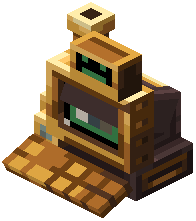 Computer first, place it down, and interact with it to open its interface. From there you can browse and select music, then use a
 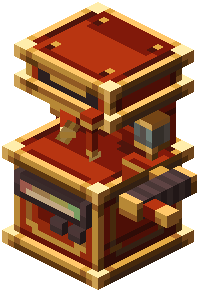 CD Burner to write tracks onto a blank
  Music CD.
Computer first, place it down, and interact with it to open its interface. From there you can browse and select music, then use a CD Burner to write tracks onto a blank Music CD.How do I burn a music CD in Net Music Mod?
Put a blank Music CD into the CD Burner and use the Computer to pick the tracks you want written to it. Once the burn finishes, the CD holds those songs and can be played anywhere.
Music CD into the CD Burner and use the Computer to pick the tracks you want written to it. Once the burn finishes, the CD holds those songs and can be played anywhere.How do I play a music CD?
Craft a  Music Player and insert a burned Music CD into it. The player then plays the tracks on that disc, and you can carry it with you while you explore.
Music Player and insert a burned Music CD into it. The player then plays the tracks on that disc, and you can carry it with you while you explore.How do I carry my music player around?
Craft the  Music Player Backpack and put your Music Player inside it so it stays with you. The backpack gives the player portable storage so you don't have to hold it in your hand.
Music Player Backpack and put your Music Player inside it so it stays with you. The backpack gives the player portable storage so you don't have to hold it in your hand.See all 20 Net Music questions ›
Related mods
Other wikis you may find useful.
 Music Maker
 Boss Music Mod
 Biome Music Mod
 More Music Discs
 Reactive Music Mod
 Illager Raid Music Mod
 Music Delay Remover (Infinite Music)