
Apparent Ores Resource Pack Wiki

Apparent Ores Resource Pack Wiki & Guide
wiki.9minecraft.net/apparent-ores-resource-pack/
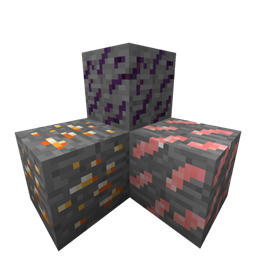
Alters the visual appearance of ore blocks in the game world.
Guides
Step-by-step, in-game.
Comparing Ore Values While MiningPrioritize Ores by Visibility Since all ores glow with the same luminous effect, you'll need to rely on ore color and…Finding Ores Faster in CavesUse the Glow to Scan Efficiently With Apparent Ores installed, all ore blocks emit a subtle luminous outline, making…Mining Deep Ore Veins Without Missing BlocksSpot Complete Ore Clusters Apparent Ores makes it easy to see entire ore veins at once, since every ore block glows…Navigating Low-Light Mining Without TorchesMine Safely in Darkness The glowing ore outlines provide enough visual reference to navigate caves without relying on…
Frequently asked questions
Why can't I see the glow effect on ores?
Make sure you have the resource pack enabled in your resource pack menu and positioned above any conflicting packs. The glow effect works best in darker environments like caves or deep underground—it may be subtle in bright daylight.
Does this work with other resource packs?
Yes, but pack order matters. Place Apparent Ores above other packs in your resource pack list so its textures take priority. If another pack also modifies ore textures, they may conflict.
Will this resource pack affect my FPS?
The glow effect has minimal performance impact since it only adds luminous outlines to existing ore textures. You may notice a very slight decrease on older hardware, but most modern systems won't be affected.
Can I use this on a multiplayer server?
Yes, resource packs are client-side only, so you can use this on any server without the server needing to install it. Other players won't see the glow effect unless they also have the pack installed.
See all 10 Apparent Ores questions ›
Related mods
Other wikis you may find useful.
 Fun Ores
 All The Ores
 Bedrock Ores Mod
 Dense Ores Abundant