
How to Make Blinds and Use Them as Working Window Coverings
Blinds are the signature decorative block of Beautify Refabricated, and unlike most  decorative blocks they actually do something: they open and close.
Crafting Blinds
Blinds come in wood variants (Oak, Birch, Jungle, Acacia, Dark Oak, Mangrove, Cherry, Crimson, and so on) plus an Iron variant. The recipe follows the wood type, so gather the matching planks and check the recipe book in your  crafting screen — the mod registers its recipes normally, so JEI/REI will show you the exact layout.
 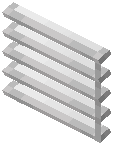 Iron Blinds use iron instead of planks.
Placing and Operating Them
Place blinds against a wall or in a window opening like any other block. Once placed, interact with them (right-click by default) to toggle them between the open and closed state. Closed blinds block the view through the window; open blinds let you see out. This makes them genuinely useful for hiding interiors from outside while still letting light and sight through when opened.
Practical Uses
- Line a row of blinds along a wall and toggle them individually for a slatted-shutter look.
- Use Iron Blinds in industrial or modern builds where wooden slats would look out of place.
- Combine blinds with lattices in the same window for a layered treatment.
If a blind will not toggle, make sure you are not sneaking and that nothing is blocking the interaction.