
Serene Horizon Glow Resource Pack FAQ
10 questions players actually ask, answered.
Does this resource pack work with other packs or mods?
Serene Horizon Glow works best as a standalone resource pack, but you can layer it with other packs in your resource pack menu—place Serene Horizon Glow lower in the list if you want other packs' textures to override it selectively. Mods that add new blocks may not have softened colors unless those mods include their own texture adjustments.
Will this pack make it harder to see ores while mining?
No—while the pack softens overall colors, ores remain visually distinct from stone so you can still spot them while mining. If you find ore visibility challenging, try adjusting your brightness settings or mining in well-lit caves.
How do I get the warm lighting effect shown in the screenshots?
The warm glow comes from the resource pack's color adjustments combined with strategic lighting from torches, lanterns, and candles placed in your builds. The pack itself doesn't change light mechanics, so place light sources where you want that cozy atmosphere.
Can I use this pack on a multiplayer server?
Yes—resource packs are client-side only, so you can use Serene Horizon Glow on any server without affecting other players or requiring server permission.
Does this pack change how grass and foliage colors work in different biomes?
The pack softens grass and foliage colors across all biomes to fit the cottagecore aesthetic, but biome-specific color variations still apply—deserts will look warmer and forests cooler, just with gentler tones overall.
Will using this pack reduce my FPS?
No—the pack only adjusts colors and doesn't add extra detail or particles, so it has no performance impact compared to vanilla textures.
How do I make my builds look cohesive with this resource pack's color palette?
Stick to warm, muted wood tones, soft stone blocks, and earth-toned materials like terracotta and copper; avoid bright primary colors and high-contrast blocks that clash with the pack's gentle aesthetic. The pack's softened palette naturally harmonizes with cottagecore-style builds using these materials.
Does this pack work with Caves & Cliffs or newer cave generation?
Yes—the pack applies its soft color adjustments to all stone types and ores in any cave system, including those from newer updates.
Can I adjust how warm or cool the colors are?
The resource pack itself doesn't include built-in settings, but you can layer it with other color-adjustment packs or use your monitor's color temperature settings to fine-tune the warmth to your preference.
Why do my nether blocks look different than expected?
The pack softens nether materials like 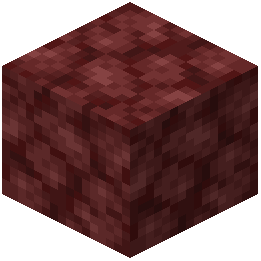 netherrack and soul sand to match the overall cottagecore aesthetic, so they appear less harsh than vanilla—this is intentional and helps the nether feel less jarring when building atmospheric spaces there.
netherrack and soul sand to match the overall cottagecore aesthetic, so they appear less harsh than vanilla—this is intentional and helps the nether feel less jarring when building atmospheric spaces there.