
How to Use the Powered Heating Coil
What It Replaces
The 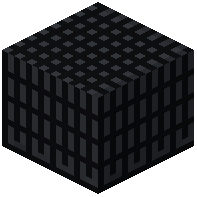 Powered Heating Coil is an alternative heat source for your foundry. Instead of burning solid fuel, it consumes energy (FE/RF) from a connected power source. This is the key block for automating a foundry, since you can pipe power in continuously without restocking fuel.
Placement and Wiring
Place the Powered Heating Coil so it touches the foundry shell — typically on the same face as, or adjacent to, the Foundry Controller. Connect an energy cable or conduit from your power generation to the coil. Once powered, the coil heats the foundry's interior the same way a fuel source would, but without producing ash or requiring manual refills.
Why Players Use It
- Automation: pair it with item pipes feeding the controller and you have a fully hands-off
 smelting line.
 - Consistency: no fuel gaps means the foundry stays hot and molten metal keeps flowing.
- Upgrades: the coil is often the block players upgrade first when scaling a foundry, because it removes the fuel bottleneck.
Troubleshooting
If the foundry isn't melting, check that the coil is actually receiving power (look for a filled energy bar in its GUI) and that it's touching the foundry shell. A coil placed  one block away from the shell won't heat anything.