
Planks 3D Resource Pack FAQ
10 questions players actually ask, answered.
Do I need to do anything after installing the pack or does it just work?
The pack applies automatically once installed—just load a world and your wooden planks will have 3D depth. No configuration or commands needed.
Why do my stairs and fences still look flat?
Stairs, fence gates, doors, and fences are intentionally kept in their standard style to maintain game performance and visual consistency with the rest of your world.
Does this pack work with other resource packs?
It depends on load order and what the other pack modifies; if another pack also changes wooden blocks, one will override the other. Test by placing them in different orders in your resource pack folder.
Will using 3D wooden blocks make my game lag?
The pack is designed to have minimal performance impact since only planks and slabs are affected, but performance depends on your system and render distance—test in your world to see if you notice a difference.
Can I use this pack in multiplayer or on a server?
Yes, resource packs are client-side only, so you can use it on any server or multiplayer world without needing permission or affecting other players.
Do the 3D planks work with all wood types including Nether woods?
Yes, the pack applies 3D depth to all wooden plank variants, including crimson and 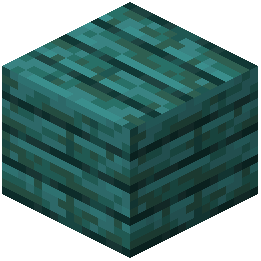 warped planks from the Nether.
warped planks from the Nether.How do I mix different wood types to get the best visual contrast?
Combine lighter woods like birch with darker woods like dark oak or warped planks in your builds; the 3D depth makes the color differences more striking when blocks are placed side by side.
warped planks in your builds; the 3D depth makes the color differences more striking when blocks are placed side by side.Do the inventory and crafting menu icons match the 3D look?
Yes, the pack updates inventory and crafting menu textures to display the new 3D appearance so your hotbar and menus are consistent with what you see in the world.
Can I use 3D slabs to create detailed decorative patterns?
Absolutely—slabs have the same 3D depth as full blocks, making them perfect for creating layered textures, detailed flooring, and intricate wall designs.
What should I do if the 3D textures aren't showing up on my wooden blocks?
Make sure the pack is enabled in your resource pack list and positioned above any conflicting packs; if it's still not working, try reloading the world or restarting the game.