
Exposure Wiki › FAQ
Exposure FAQ
20 questions players actually ask, answered.
How do I take my first  photograph?
Craft a  Camera, load it with film, then right-click to look through the viewfinder and press the shutter key to capture. You need film in the camera before it will take a shot, and the resulting undeveloped film must be processed in a
 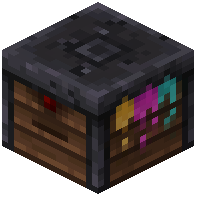 Lightroom before you get a usable Photograph.
Camera, load it with film, then right-click to look through the viewfinder and press the shutter key to capture. You need film in the camera before it will take a shot, and the resulting undeveloped film must be processed in a Lightroom before you get a usable Photograph.Why is my photo blank or undeveloped?
Film straight out of the camera is undeveloped and can't be viewed or framed yet. Take the exposed film to a Lightroom and develop it into  Developed
  Color Film or
  Developed
  Black and White Film, which you then turn into Photographs.
Developed Color Film or Developed Black and White Film, which you then turn into Photographs.What's the difference between color and black and white film?
Color Film and Black and White Film produce different-looking photographs, with black and white giving a monochrome result. High-Sensitivity versions of both expose faster, letting you shoot in darker conditions or with shorter exposure times.How does the Lightroom work?
The Lightroom is where you process exposed film into developed film and then into Photographs. Place your undeveloped film inside and follow the developing process; chromatic sheets and other materials are used alongside it depending on the film type.
Lightroom is where you process exposed film into developed film and then into Photographs. Place your undeveloped film inside and follow the developing process; chromatic sheets and other materials are used alongside it depending on the film type.How do I display my photos?
Craft a  Photograph Frame or
  Glass Photograph Frame and place a Photograph inside it to hang it on a wall. For collections, use a
  Photo Album to store and flip through multiple photos, and a
  Signed Photo Album if you want to label or dedicate it.
Photograph Frame or Glass Photograph Frame and place a Photograph inside it to hang it on a wall. For collections, use a Photo Album to store and flip through multiple photos, and a Signed Photo Album if you want to label or dedicate it.What is the  Interplanar Projector for?
The Interplanar Projector is used to project or transfer photographs across dimensions or distances. A  Broken Interplanar Projector is the damaged version you'll need to repair or replace before it functions.
Interplanar Projector is used to project or transfer photographs across dimensions or distances. A Broken Interplanar Projector is the damaged version you'll need to repair or replace before it functions.How do I use the  Camera Stand?
Place a Camera Stand and mount a Camera on it to take stabilized or remote shots without holding the camera yourself. This is useful for self-portraits, group photos, or framing a scene from a fixed angle.
Camera Stand and mount a Camera on it to take stabilized or remote shots without holding the camera yourself. This is useful for self-portraits, group photos, or framing a scene from a fixed angle.Can I take photos of mobs and players?
Yes, the Camera captures whatever is in its viewfinder, including mobs, players, and scenery. The resulting Photograph preserves that image so you can frame it or store it in an album.
Camera captures whatever is in its viewfinder, including mobs, players, and scenery. The resulting Photograph preserves that image so you can frame it or store it in an album.My camera won't shoot — what am I doing wrong?
The most common cause is having no film loaded, or having already used up the film in the camera. Check that film is inserted and that you have light or the right exposure settings for the scene.
camera. Check that film is inserted and that you have light or the right exposure settings for the scene.Does Exposure work with shaders or cause lag with many photos?
Exposure is generally lightweight, but displaying many photographs in frames or albums can add rendering load, especially with shaders. If you notice lag, reduce the number of placed frames or lower your shader settings.
What does the Exposure Mod do?
Exposure is a camera mod focused on process and aesthetics. You expose light-sensitive film with a camera, develop it, and print photographs in a Lightroom block.
camera mod focused on process and aesthetics. You expose light-sensitive film with a camera, develop it, and print photographs in a Lightroom block.What items and blocks does Exposure add?
It registers 19 items and blocks, including the camera, camera stand, black and white film, color film, high-sensitivity film variants, developed film, photograph, photograph frame, glass photograph frame, photo album, signed photo album,  stacked photographs, lightroom, chromatic sheet, and interplanar projector.
black and white film, color film, high-sensitivity film variants, developed film, photograph, photograph frame, glass photograph frame, photo album, signed photo album, stacked photographs, lightroom, chromatic sheet, and interplanar projector.What mobs does Exposure add?
It adds two mobs: the Camera Stand and the Photograph.
Camera Stand and the Photograph.Which Minecraft versions does Exposure support?
The Modrinth project page lists Minecraft versions 1.19.2, 1.20.1, and 1.21.1.
Which mod loaders does Exposure support?
It supports Fabric, Forge, NeoForge, and Quilt.
How do you use the camera in Exposure?
Load a Film Roll, open the Viewfinder, compose your shot, and release the shutter. Press or hold Sneak while looking through the Viewfinder to control settings like Focal Length, Shutter Speed, Flash mode, and Composition Guides.
How many frames does a film roll hold in Exposure?
A single film roll can fit 16 frames.
How do you print photographs in Exposure?
Photographs are printed with the Lightroom block. Black and white prints require Paper and Black Dye, while color prints also need Cyan, Magenta, and Yellow dyes.
Lightroom block. Black and white prints require Paper and Black Dye, while color prints also need Cyan, Magenta, and Yellow dyes.What attachments can you put on the camera in Exposure?
Using the Camera while sneaking opens the Attachments window, where you can load a Film, equip a Flash (Redstone Lamp), modify the Lens (Spyglass), and put a Filter on the lens (Glass Panes).
Camera while sneaking opens the Attachments window, where you can load a Film, equip a Flash (Redstone Lamp), modify the Lens (Spyglass), and put a Filter on the lens (Glass Panes).What mods are incompatible with Exposure?
Known incompatibilities include Optifine, Visual Overhaul, Exordium, and FastAnim on Fabric. Sodium or Embeddium is suggested instead of Optifine.