
Crayon Craft Resource Pack FAQ
10 questions players actually ask, answered.
How do I install Crayon Craft and start seeing the hand-drawn textures?
Place the resource pack file into your resourcepacks folder, then open your world or create a new one. In the resource packs menu, move Crayon Craft to the active side—you'll see the crayon and pencil textures load immediately in your world.
Will Crayon Craft work with other resource packs?
Yes, but the pack that appears higher in your resource packs list takes priority. If you want Crayon Craft's textures to show, place it above any competing packs in the active list.
Do the crayon textures affect gameplay or just visuals?
Crayon Craft is purely visual—it changes how blocks and items look but doesn't alter any game mechanics, recipes, or survival difficulty.
Why do some blocks still look normal instead of hand-drawn?
Crayon Craft covers most common blocks and biome terrain, but some newer blocks or those from other mods may not have custom crayon textures. Check the mod's feature list to see which blocks are restyled.
Can I use Crayon Craft on a multiplayer server?
Yes—install it on your client side only. Other players won't see your crayon textures unless they also install the pack, and it won't affect server gameplay or other players' worlds.
Does Crayon Craft change how potions and inventory items look?
Yes, the pack replaces item icons and  potion bottles with hand-drawn doodle versions to match the overall playful aesthetic.
potion bottles with hand-drawn doodle versions to match the overall playful aesthetic.Will Crayon Craft slow down my game?
Resource packs have minimal performance impact. If you experience lag, it's usually from other mods or world size, not the textures themselves.
How does Crayon Craft style underground structures like dungeons and trial chambers?
The pack replaces stone, copper, and 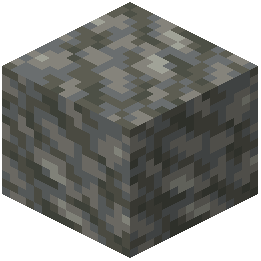 tuff blocks with scribbled crayon versions, so dungeons, trial chambers, and deep caves all get the same playful hand-drawn treatment as the surface world.
tuff blocks with scribbled crayon versions, so dungeons, trial chambers, and deep caves all get the same playful hand-drawn treatment as the surface world.Can I customize which textures from Crayon Craft I want to use?
You can layer Crayon Craft with other packs or manually edit texture files, but the easiest approach is to use it as-is or combine it with a complementary pack for selective changes.
Does Crayon Craft work with mods that add new blocks?
Only if those new blocks happen to use standard Minecraft textures that Crayon Craft has restyled. Blocks unique to other mods will keep their default appearance unless the mod author provides crayon textures for them.