
Using the Spawn Box with Mods That Depend on Moonlight Lib
Understand the relationship
Moonlight Lib supplies the 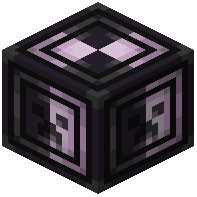 Spawn Box block and the underlying code, but the mod that depends on it decides what the box does. Think of Moonlight Lib as the plumbing and the dependent mod as the fixture. Your job as a player is to set up the dependent mod's system, then use the Spawn Box as the point where that system interacts with the world.
Setting it up
1. Identify which of your installed mods depends on Moonlight Lib. Its description or dependency list will say so.
2. Read that mod's own guide or in-game tooltips for how it uses the Spawn Box, since the exact behavior (what it spawns, where, and under what conditions) comes from that mod.
3. Place the Spawn Box where the dependent mod expects it, typically inside or adjacent to the structure the mod manages.
4. Configure the dependent mod's settings first, then interact with the Spawn Box to apply or trigger them.
Tips
- Keep Moonlight Lib updated alongside its dependents; mismatched versions are the most common source of the Spawn Box not working.
- If you run several mods that use Moonlight Lib, they share the same library, so you only need one copy installed.
- Test in a creative world before committing to a survival build, since spawn behavior can be hard to undo once mobs are loose.