
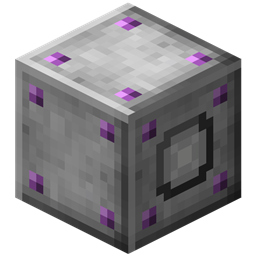
 DownloadClick Machine
Get the files on 9Minecraft
Contents (5)
Guides
Step-by-step, in-game.
How to Automate Repeated Block Breaking with the Click MachineBreaking the same block over and over is tedious, and the Click Machine exists to remove that tedium. This guide…How to Set Up a Click Machine to Auto-Farm or Auto-MineThe Click Machine is built for one job: standing in for your mouse hand. Point it at a block or interface and it will…How to Use the Click Machine as a Right-Click Auto ClickerA lot of players search for a "right click machine " because right-clicking is how you use tools, place blocks, and…Troubleshooting a Click Machine That Isn't ClickingYou placed the Click Machine , aimed it, and nothing is happening. Work through these checks in order before…
Recipes
Every recipe the mod adds, grouped by how it is made.
Blocks
 Click Machine (Auto Clicker)
 Click Machine
Frequently asked questions
How do I get started with the Click Machine Mod?
Craft a Click Machine and place it directly next to the block or interface you want it to click. Open its interface to set the click type (left or right) and how often it clicks, then give it a redstone signal or toggle it on to start.
What's the difference between the Click Machine and the Click Machine (Auto Clicker)?
The Click Machine is the placeable block you configure and power in the world, while the Auto Clicker variant is the item form used for the same repeated-click behavior. Check the wiki's blocks list for which one your setup needs.
How do I make the Click Machine right click instead of left click?
Open the Click Machine's GUI and switch the click mode from left to right. Right-click mode is what you use for things like placing blocks, using items on a block, or interacting with interfaces such as chests and machines.
Can the Click Machine break blocks automatically?
Yes, in left-click mode the Click Machine performs repeated player-style block breaking on the adjacent block. It only affects the block it's facing, so position it against the block you want mined.
How do I set the click speed or delay on the Click Machine?
The Click Machine's interface has a timing control that determines how often it clicks. Adjust it to match the tick rate your farm or machine can handle rather than leaving it at the fastest setting.
Does the Click Machine need redstone or power?
The Click Machine is toggled with a redstone signal, so you can turn it on and off with a lever, button, or redstone line. Without a signal it stays idle, which is useful for pausing automation.
Why isn't my Click Machine doing anything?
The most common causes are no redstone signal, the wrong click mode (left vs right), or nothing valid in the adjacent block space. Make sure the machine is facing the block or interface you want it to interact with and that the target is actually clickable.
Can the Click Machine use items or tools from my inventory?
The Click Machine simulates a player click on the adjacent target, so it does not pull tools or items out of your inventory. For anything requiring a held item, you need a different automation setup.
Does the Click Machine work with other mods' machines and chests?
Yes, as long as the target block responds to a normal player right-click, the Click Machine can interact with it. This makes it useful for automating interfaces from other mods, though blocks that require a specific held item won't work.
Will a Click Machine cause lag if I use a lot of them?
Each Click Machine performs clicks on a timer, so running many at a fast rate can add up. Space them out, slow the click interval where possible, and avoid pointing several at the same block to keep performance stable.
Gallery
11 images from the Click Machine Mod page.


You May Also Like
Wikis that share the most with this one
Wikis on the same theme: machine
More mod wikis on the site
The most downloaded mods that have a wiki here
A few wikis from each of the other kinds