

 DownloadCamera Motion Blur Mod
Get the files on 9Minecraft
Guides
Step-by-step, in-game.
Create a Rainbow Motion Blur EffectAccess Color Settings Open the settings GUI with /camerablur and locate the Color Effects section. Select the Rainbow…Reduce Motion Blur for Competitive GameplayLower Blur Strength Open /camerablur and decrease the Blur Strength to a minimal level. A very low setting preserves…Set Up Motion Blur for Cinematic RecordingConfigure Blur Strength Open the settings menu with /camerablur and navigate to the Blur Strength slider. For…Troubleshoot Motion Blur Not AppearingVerify the Mod is Enabled Use /camerablur toggle to ensure motion blur is turned on. If the command doesn't work, the…
Frequently asked questions
How do I open the motion blur settings?
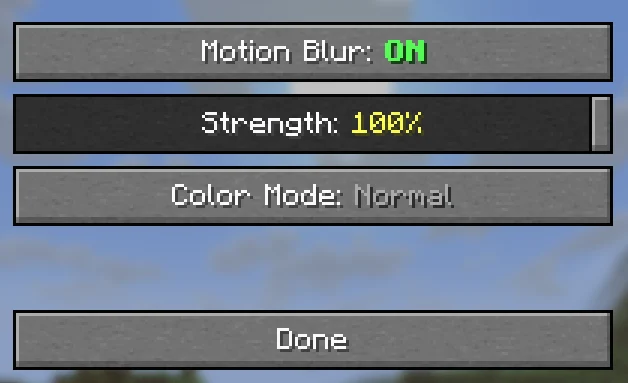
Type /camerablur in chat to open the settings GUI, or use /camerablur toggle to turn motion blur on and off quickly without opening the menu.
What's the difference between blur strength settings?
Lower strength values (closer to 0) create subtle blur that's good for normal gameplay, while higher values create more pronounced cinematic blur; you can adjust this with /camerablur strength followed by a number.
Can I use motion blur while playing competitively?
Yes, but you'll want to reduce the blur strength significantly or disable it entirely, since motion blur can make it harder to track fast-moving targets and react quickly.
How do I enable rainbow mode?
Open the settings GUI with /camerablur and look for the color effects options; rainbow mode cycles through colors automatically once enabled.
See all 10 Camera Motion Blur questions ›
Gallery
4 images from the Camera Motion Blur Mod page.
You May Also Like
Wikis that share the most with this one
More mod wikis on the site
The most downloaded mods that have a wiki here
A few wikis from each of the other kinds