

 DownloadLithos Resource Pack
Get the files on 9Minecraft
Contents (8)
Guides
Step-by-step, in-game.
Choosing Colors for Your Build Using LithosUnderstanding Color Consistency Lithos maintains the same color palette and brightness levels as default Minecraft…Decorating Interiors with Lithos DetailsTaking Advantage of Texture Clarity At 32x resolution, Lithos makes decorative blocks and furniture much more…Maintaining Consistency Across Different BiomesUnderstanding Biome Palette Harmony Lithos preserves the default texture relationships, so blocks maintain consistent…Making Detailed Terrain with Lithos TexturesLeveraging Enhanced Detail Lithos' 32x resolution provides richer surface detail than default textures while…
Items
590 items · showing 24. Browse all →
 Acacia Boat
 Acacia Boat with Chest
 Acacia Door
 Acacia Hanging Sign
 Acacia Sign
 Allay Spawn Egg
 Amethyst Shard
 Angler Pottery Sherd
 Apple
 Archer Pottery Sherd
 Armadillo Scute
 Armadillo Spawn Egg
 Armor Stand
 Arms Up Pottery Sherd
 Arrow
 Axolotl Spawn Egg
 Baked Potato
 Bamboo
 Bamboo Door
 Bamboo Hanging Sign
 Bamboo Raft
 Bamboo Raft with Chest
 Bamboo Sign
 Banner Pattern
Blocks
545 blocks · showing 24. Browse all →
 Acacia Button
 Acacia Leaves
 Acacia Log
 Acacia Planks
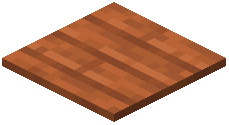 Acacia Pressure Plate
 Acacia Sapling
 Acacia Shelf
 Acacia Trapdoor
 Activator Rail
 Allium
 Amethyst Cluster
 Andesite
 Anvil
 Attached Melon Stem
 Attached Pumpkin Stem
 Azalea Leaves
 Azure Bluet
 Bamboo Button
 Bamboo Fence
 Bamboo Fence Gate
 Bamboo Mosaic
 Bamboo Planks
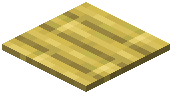 Bamboo Pressure Plate
 Bamboo Shelf
What this pack changes
Every texture group the pack replaces, counted from the pack itself.
| Area | Textures replaced |
|---|---|
| Blocks | 3,269 |
| Items | 1,152 |
| Items | 679 |
| Mobs & entities | 672 |
| GUI & menus | 486 |
| Blocks | 336 |
| Particles | 242 |
| Model | 69 |
| Paintings | 53 |
| Armor trims | 40 |
| Status effects | 40 |
| Maps | 36 |
| Mobs | 26 |
| Armor | 23 |
| Sky & weather | 14 |
| Misc | 9 |
| Models | 4 |
| Font | 4 |
| Biome colours | 2 |
| Companions | 1 |
Pack format 84–150 (Minecraft 1.21.9)7,158 texture files in total
Extra features
Custom entity models (OptiFine/CEM)
Random entity textures
Custom font
Custom block/item models
Reworked GUI
Frequently asked questions
Does lithos work with other resource packs?
Lithos is a standalone resource pack and will override other packs if both are enabled. If you want to use Lithos alongside another pack, load Lithos first in your resource pack list so the other pack's textures take priority for blocks it modifies.
Why do my blocks look different colors than default Minecraft?
Lithos maintains the same color and brightness values as default blocks for construction materials, so your builds should look identical in tone—the difference is in detail and texture quality, not hue. If colors seem off, check that you're not mixing Lithos with another resource pack.
Can I use lithos on servers?
Yes, Lithos is a client-side resource pack, so it works on any server without requiring the server to install it. Only you will see the detailed textures; other players see the default or their own resource pack.
Lithos textures look blurry on my screen
At 32x resolution, Lithos textures may appear soft if your GUI scale is set too high or if you're viewing blocks from far away. Try adjusting your GUI scale in Video Settings, or get closer to blocks to see the detail clearly.
Which blocks have the most detail in lithos?
Construction and decoration blocks like wood, stone, dirt, and metal variants receive the most attention in Lithos, while utility blocks like redstone components and technical blocks receive lighter detail. Check the Decorating Interiors guide for blocks with rich surface textures.
Does lithos affect performance?
Lithos is only 32x resolution, so it has minimal performance impact compared to higher-resolution packs. If you experience lag, it's likely due to other mods or settings rather than the resource pack itself.
How do I make my terrain look good with lithos?
Lithos textures blend naturally because they maintain default color consistency, so focus on varied block placement and layering. See the Making Detailed Terrain guide for techniques on using stone, dirt, and grass blocks to create depth.
Do connected textures work in lithos?
Lithos provides textures that work with connected texture mods if you have one installed, but connected textures are not required—the pack looks good on its own. If you use a connected texture mod, enable it in your mod settings to see extra visual polish.
Why do blocks look different between biomes?
Lithos maintains biome-specific coloring for grass and foliage, which is vanilla Minecraft behavior and not a pack issue. Refer to the Maintaining Consistency Across Different Biomes guide if you want your builds to look uniform across multiple biomes.
Can I edit lithos textures myself?
Yes, resource packs are editable—you can unzip the Lithos pack and modify individual texture files in an image editor, then rezip it. Keep in mind that editing textures yourself means you won't receive updates to those files if the pack is updated.
You May Also Like
Wikis that share the most with this one
Wikis on the same theme: wood
More resource pack wikis on the site
Link’s RPG Font Resource PackLink’s 3D Rails Resource PackLinal Threshold Resource PackLimitless Designs Resource PackLILAC HUD Resource PackLightened Armor Resource PackLight Levels Resource PackLight Leak Resource PackLeviosa Resource Pack Legs and Arm’s UNDEAD Pack Resource PackLegendary Rt Textures Resource PackLeafy Creepers Resource Pack
The most downloaded mods that have a wiki here
A few wikis from each of the other kinds
Gallery
12 images from the Lithos Resource Pack page.


