

 DownloadAeternum Realism Resource Pack
Get the files on 9Minecraft
Contents (8)
Guides
Step-by-step, in-game.
Creating Scenic Landscapes and SettlementsLeveraging Biome-Specific Foliage The pack retextures leaves and grass across all biomes with natural colors and…Getting the Best Visual Quality from Realistic TexturesOptimize Your Graphics Settings Aeternum Realism's 32x textures shine brightest with proper in-game settings. Open…Making Your Base Look Better with Realistic Block TexturesChoosing Blocks for Visual Impact Aeternum Realism updates all blocks with consistent, detailed materials. Wooden…Understanding Mob Variations and AnimationsWhat to Expect When Encountering Mobs Aeternum Realism replaces creature models with detailed, lifelike versions.…
Items
118 items · showing 24. Browse all →
 Apple
 Armor Stand
 Arrow
 Baked Potato
 Banner Pattern
 Beetroot
 Beetroot Seeds
 Bone
 Bottle o' Enchanting
 Bow
 Bread
 Bucket
 Carrot
 Charcoal
 Coal
 Cooked Chicken
 Cooked Cod
 Cooked Mutton
 Cooked Porkchop
 Cooked Rabbit
 Cooked Salmon
 Cookie
 Diamond
 Diamond Axe
Blocks
303 blocks · showing 24. Browse all →
 Acacia Door
 Acacia Log
 Acacia Planks
 Acacia Sapling
 Acacia Trapdoor
 Activator Rail
 Allium
 Andesite
 Azalea Leaves
 Azure Bluet
 Bamboo
 Bamboo Planks
 Bamboo Shoot
 Bamboo Trapdoor
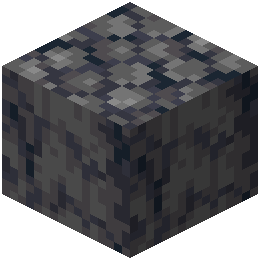 Basalt
 Bedrock
 Birch Door
 Birch Log
 Birch Planks
 Birch Sapling
 Birch Trapdoor
 Black Concrete
 Black Terracotta
 Black Wool
What this pack changes
Every texture group the pack replaces, counted from the pack itself.
| Area | Textures replaced |
|---|---|
| Blocks | 2,436 |
| Items | 475 |
| Particles | 235 |
| Mobs & entities | 53 |
| Models | 17 |
| Sky & weather | 4 |
| Biome colours | 2 |
| GUI & menus | 1 |
Pack format 34 (Minecraft 1.21.2)3,223 texture files in total
Extra features
Custom block/item models
Reworked GUI
Frequently asked questions
How do I enable the 3D equipment models without them blocking my view?
The 3D equipment is designed to render at an angle that keeps your crosshair and hotbar clear during combat. If models feel intrusive, check your FOV (field of view) settings—a slightly wider FOV can help them feel less centered on screen.
Why do mobs look different from each other in my world?
Aeternum Realism includes random mob variations and animations that make creatures in herds or crowds appear unique. This is intentional and makes encounters feel more natural—each mob has subtle differences in appearance and movement.
Can I use this with animation mods or other resource packs?
Yes, the pack includes optional setup support for community animation packs. Load Aeternum Realism first in your resource pack list, then add animation packs after it so they layer on top without conflicts.
My leaves and grass look washed out or don't match the biome. What's wrong?
Make sure your graphics settings are set to 'Fancy' for leaves and that biome colors are enabled in your video options. Aeternum Realism uses natural color variation across biomes, so 'Fast' graphics mode may not display these properly.
Does this pack work on lower-end computers?
Yes—Aeternum Realism is optimized to run smoothly on regular setups without requiring high-end hardware. The 32x resolution is detailed but not demanding compared to larger texture packs.
How do I make my base look better with these textures?
Focus on using blocks with consistent material themes—stone, wood, and metal blocks now have realistic surfaces that work well together. Refer to the guide 'Making Your Base Look Better with Realistic Block Textures' for specific block combinations and building techniques.
Why do some items in my inventory look different or hard to identify?
Aeternum Realism updates items with consistent material styling, which can make similar items look closer together visually. Hover over items to see their names, or refer to the 'Getting the Best Visual Quality' guide for tips on organizing your inventory.
Can I use this in multiplayer or PvP servers?
Yes, resource packs are client-side only and don't affect server gameplay or give you an unfair advantage. The pack keeps PvP responsive by maintaining smooth performance even with detailed textures.
How do I create scenic landscapes that look good with these textures?
Use the natural grass and foliage retextures to your advantage—they show realistic color variation across biomes, so landscapes feel more alive. The guide 'Creating Scenic Landscapes and Settlements' covers terrain shaping and placement techniques that work best with Aeternum's realistic look.
Do I need to change my video settings after installing this pack?
Set graphics to 'Fancy' and enable biome colors for the best results, but the pack works on 'Fast' settings too—just with less visual detail. Adjust your brightness if the realistic textures feel too dark or bright for your preference.
You May Also Like
Wikis that share the most with this one
LB Photo Realism ReloadCursed Canon Realism ModMax Realism Resource PackRealism Mats Resource Pack Aeternum Seasons Resource PackRealism Upscaled Resource PackCineReal Cinematic Realism ShadersUltimate Realism Pack Resource PackOptimum Realism Pom Pbr Resource PackAurelis Realism 512X Pbr Resource PackBetter Realism MC Vanilla & Realism ModpackReasonable Realism Mod 1.7.10 for Minecraft
Wikis on the same theme: wood
More resource pack wikis on the site
AE2 Bright Assets and Redraws Resource PackAdventure Time Craft Java Edition Resource PackAcrit’s Fancy Nature Resource PackAccurate Iron Ore CTM Resource PackAbibliophobia Enchanted Books Resource PackA7Mds 3D Potions Resource PackA Vanilla Overlay Resource PackA Btv Texture Pack 64Px Full 3 D Pom Resource Pack3D Vanilla Items Resource Pack3D Muskets Resource Pack3D Ladders Resource Pack3D Items Vanillaism Resource Pack
The most downloaded mods that have a wiki here
A few wikis from each of the other kinds
Gallery
11 images from the Aeternum Realism Resource Pack page.


