

 DownloadAngel Hare Textures Resource Pack
Get the files on 9Minecraft
Contents (8)
Guides
Step-by-step, in-game.
Customize Paintings to Match Your BuildAccessing Custom Paintings The Angel Hare Textures Resource Pack includes custom paintings that replace vanilla…Customize Your Title Screen and World AppearanceTitle Screen Customization The Angel Hare Textures Resource Pack updates your main Minecraft title screen to match…Equip and Showcase Custom Armor SetsUnderstanding Custom Armor Changes The Angel Hare Textures Resource Pack redesigns all player armor sets to match the…Set Up a Themed Music Disc DisplayCreating a Music Disc Gallery The Angel Hare Textures Resource Pack features custom-textured music discs that fit the…
Items
B
 Bow
D
 Diamond Boots
 Diamond Chestplate
 Diamond Helmet
 Diamond Horse Armor
 Diamond Leggings
 Diamond Nautilus Armor
 Diamond Spear
 Diamond Sword
 Disc Fragment
E
 Elytra
M
 Mace
 Music Disc (Creator)
 Music Disc 11
 Music Disc (Bounce)
 Music Disc (Cat)
 Music Disc (Lava Chicken)
 Music Disc (Mellohi)
 Music Disc (Pigstep)
 Music Disc (Stal)
 Music Disc (Strad)
 Music Disc (Precipice)
 Music Disc (Mall)
 Music Disc (Far)
 Music Disc (Wait)
 Music Disc (Otherside)
 Music Disc (Relic)
 Music Disc (Chirp)
 Music Disc (Creator Box)
 Music Disc 5
 Music Disc 13
 Music Disc (Blocks)
 Music Disc (Ward)
 Music Disc (Tears)
N
 Netherite Boots
 Netherite Chestplate
 Netherite Helmet
 Netherite Horse Armor
 Netherite Leggings
 Netherite Nautilus Armor
 Netherite Spear
 Netherite Sword
S
 Spectral Arrow
T
 Totem of Undying
 Trident
W
 Wolf Armor
Blocks
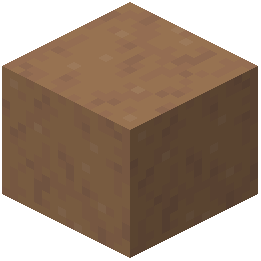 Brown Mushroom Block
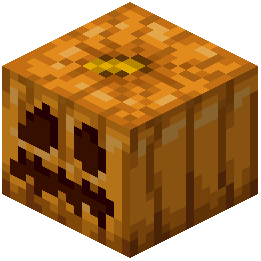 Carved Pumpkin
What this pack changes
Every texture group the pack replaces, counted from the pack itself.
| Area | Textures replaced |
|---|---|
| GUI & menus | 136 |
| Items | 59 |
| Tags | 21 |
| Mobs & entities | 16 |
| Sky & weather | 10 |
| Paintings | 10 |
| Blocks | 6 |
| Misc | 3 |
| Status effects | 2 |
| Font | 1 |
Pack format 88 (Minecraft 1.21.9)264 texture files in total
Extra features
Custom font
Custom sounds
Custom block/item models
Reworked GUI
Frequently asked questions
How do I install this resource pack?
Place the downloaded .zip file into your resourcepacks folder without extracting it, then select it in Options > Resource Packs. The pack will apply to your world on the next load.
Will this pack work with other resource packs?
Yes, you can layer it with other packs by adjusting the order in your Resource Packs menu—packs higher in the list override those below. If textures conflict, the topmost pack's version will display.
Can I customize which paintings appear in my world?
Yes, you can edit the painting files inside the pack's assets folder to swap out art or revert specific paintings to vanilla textures before loading your world.
Do the custom music discs actually play different songs?
No, the pack only changes the visual appearance of music discs—the audio tracks remain vanilla, so they'll still play the original Minecraft songs.
Why do some items still look vanilla in my inventory?
The pack only retextures specific items and blocks featured in the Angel Hare theme; items not included will keep their default appearance.
Does this pack affect performance or FPS?
Resource packs have minimal performance impact since they only change textures, not game mechanics—you shouldn't notice any FPS difference unless you're running very low-end hardware.
Can I use this pack on a multiplayer server?
Yes, resource packs are client-side only, so you can use it on any server without needing permission or affecting other players' games.
How do I revert to vanilla textures for specific items?
You can either remove the pack entirely, place it lower in your Resource Packs priority list below a vanilla-friendly pack, or manually edit the texture files to restore originals.
Will this pack update automatically?
No, you'll need to manually download and replace the pack file when updates are released to get new textures or bug fixes.
Does the custom title screen change every time I load the game?
The pack applies a single custom title screen design that displays consistently each time you launch—it doesn't rotate or randomize.
You May Also Like
Wikis that share the most with this one
Angel RingNative Vein TexturesMissing Textures ShadersFusion (Connected Textures)Fresh Textures Resource PackFusion Connected Textures ModMC New Textures Resource PackAll White Textures Resource PackSsls Soft Textures Resource PackLegendary Rt Textures Resource PackTazkos Fresh Textures Resource PackKult Craft Pvp Textures Resource Pack
Wikis on the same theme: netherite
Fabulous 3D Resource PackMatralys 16X Resource PackLuminance Pvp Resource Pack Viking Armory Resource PackBlue Netherite Resource PackChaos Pvp Pack Resource PackTiny Tools Txf Resource PackBoxs Flag Spear Resource PackHighlighted Netherite Resource PackTorrezx Demon Soul Fire Resource PackTiny Pvp Swords And Tools Resource PackBd Hill Reforge The Sword Edge Resource Pack
More resource pack wikis on the site
An X-Shaped Crosshair Resource PackAmstellhd Zombie Apocalypse Resource PackAmong Us Totem Resource PackAmendments Spanish Translation Resource PackAmberstone Textures Pack Resource PackAmazing Mace 3D Resource PackAlya Pack Resource PackAlternative Rain Sounds Resource PackAlternative Custom Player Animations Resource PackAL’s Squids & Nautiluses Resource PackAL’s Spiders Revamped X Fresh Animations Resource PackAls Ghasts Revamped X Fresh Animations Resource Pack
The most downloaded mods that have a wiki here
A few wikis from each of the other kinds
Gallery
7 images from the Angel Hare Textures Resource Pack page.


