

 DownloadStartup Timer Mod
Get the files on 9Minecraft
Guides
Step-by-step, in-game.
How to Read the Startup Timer Display While the Game LoadsWhere the Timer Appears As soon as the mod's loading screen takes over, a small timer text appears on screen and…How to See Your Total Load Time on the Main MenuFinding the Total Time Once loading finishes and the main menu appears, the mod shows the total load time for that…How to Stop the Game Entering Fullscreen Before the Main MenuWhat the Mod Changes Normally the game may switch to fullscreen while it is still loading, which can hide the loading…How to Use the Timer to Diagnose Slow Minecraft StartupEstablish a Baseline Before you can tell whether a launch is slow, you need a normal number. Launch the game a few…
Frequently asked questions
How do I turn on the startup timer?
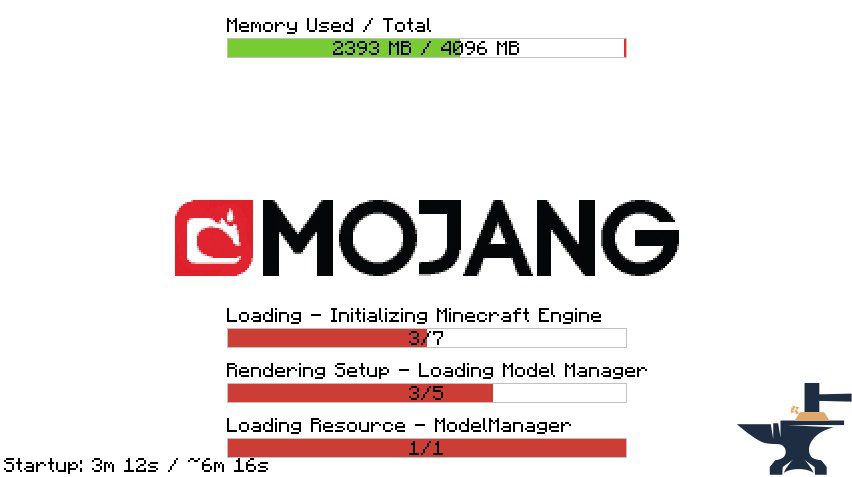
There's nothing to enable — the timer appears automatically in the corner of the loading screen as soon as the game begins starting. If you don't see it, check that the mod is actually loaded for your game instance.
Where does the timer show up while the game is loading?
It displays as a small overlay on the loading screen, showing elapsed time counting up while the game boots. It disappears once you reach the main menu, where the total is shown instead.
How do I see my total load time?
The total load time is displayed on the main menu after startup finishes. Look for the timer text on the menu screen — it shows how long the whole startup took.
Why does the game go fullscreen before the main menu?
That's the behavior this mod prevents — it holds off fullscreen until the main menu is actually displayed. If you're still seeing early fullscreen, another mod or your launcher may be forcing it.
See all 10 Startup Timer questions ›
Gallery
2 images from the Startup Timer Mod page.
You May Also Like
Wikis that share the most with this one
More mod wikis on the site
 Stargate Journey More Gates Addon Mod
The most downloaded mods that have a wiki here
A few wikis from each of the other kinds