

 DownloadPvp Haimiya Pack Anime Sky Resource Pack
Get the files on 9Minecraft
Contents (8)
Guides
Step-by-step, in-game.
Adjust Audio for Competitive AwarenessLeverage Custom Combat Sounds The PvP Haimiya Pack includes new sound effects designed specifically for fighting.…Navigate the Anime-Themed Menu SystemUnderstand the New Menu Layout The pack updates your main menu background and inventory screen with a cohesive gray…Optimize Your HUD for PvP CombatReduce Visual Clutter During Fights The PvP Haimiya Pack shrinks item icons and UI elements to keep your screen clear…Use Custom Combat Visuals to Your AdvantageRecognize Updated Weapon and Crystal Effects The pack replaces default sword and totem designs with custom…
Items
 Ender Pearl
 Golden Apple
 Golden Carrot
 Netherite Sword
 Totem of Undying
Blocks
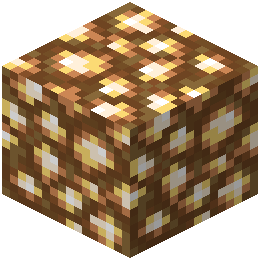 Glowstone
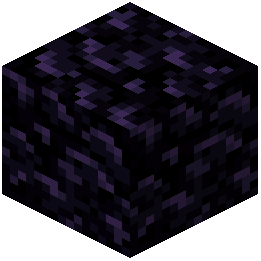 Obsidian
What this pack changes
Every texture group the pack replaces, counted from the pack itself.
| Area | Textures replaced |
|---|---|
| GUI & menus | 20 |
| Blocks | 10 |
| Items | 5 |
| Mobs & entities | 4 |
| Misc | 2 |
| Particles | 2 |
Pack format 64 (Minecraft 1.21.6)43 texture files in total
Extra features
Custom sounds
Custom block/item models
Reworked GUI
Frequently asked questions
How do I enable the anime sky after installing the pack?
The anime sky activates automatically once you load a world with the resource pack applied. If you don't see it, check that the PvP Haimiya Pack is selected in your resource pack list (Settings > Resource Packs) and ranked above any conflicting packs.
Why does my inventory look different and smaller?
The pack intentionally shrinks item icons to reduce visual clutter during PvP fights, giving you a cleaner screen. This is a core feature designed to help you focus on combat rather than inventory aesthetics.
Can I use this pack with other resource packs?
Yes, but pack order matters—place PvP Haimiya Pack higher in your resource pack list than packs you want to override. If textures conflict (like custom swords or menus), the higher-ranked pack will take priority.
The enchantment glint looks weird. Did I install it wrong?
The gray anime-themed enchantment glint is intentional and designed to match the pack's aesthetic. If it looks broken or invisible, try reloading your resource packs or updating to the latest version of the pack.
Do the custom combat particles affect my FPS?
Custom particles have minimal performance impact, but if you experience lag during fights, try lowering your particle settings in Video Settings or disabling other visual mods that add effects.
Will this pack work on multiplayer servers?
Yes, resource packs are client-side only, so you can use PvP Haimiya Pack on any server without needing admin approval. Other players won't see your custom textures or sky.
How do I customize the HUD with this pack?
The pack provides a sleek default HUD, but you can further adjust it through mods like Sodium or by editing the pack's files if you have technical knowledge. Check the guides on optimizing your HUD for PvP combat for specific tweaks.
Are the new sound effects louder or quieter than default?
The custom combat sounds are designed for competitive awareness, but you can adjust individual sound volumes in your game settings (Music & Sounds) to suit your preference.
Does this pack change block textures or just cosmetics?
PvP Haimiya Pack focuses on cosmetic changes like menus, items, sky, and particles rather than altering block textures, keeping the core gameplay visually recognizable.
Why is my main menu background not showing the anime style?
Make sure the resource pack is active and at the top of your resource pack list. If it's still not working, try restarting your game or re-applying the pack through your resource pack settings.
You May Also Like
Wikis that share the most with this one
Sky Anime Resource PackCubees Anime Saga Pack ModelDark Anime Sky Resource PackToon Cel Anime Style ShadersAnime Waifu Beds Resource PackAnime Waifu Totem Resource PackAnime Waifu Beds #20 Resource PackAnime Waifu Beds #26 Resource PackPvp Zegarn Anime Sky Resource PackCpvp Alya Kujo Anime Sky Resource PackCpvp Miku Nakano Anime Sky Resource PackCpvp Umi Asanagi Anime Sky Resource Pack
More resource pack wikis on the site
PvP Essentials Overlay Resource PackPvp Essential Utilities Resource PackPvp Basics Resource PackPurplefied Gui Resource PackPuff Radio Resource PackPseudo Localization Language Pack Resource Pack Prominence Of Minecraft Resource PackProgrammer Art x Fresh Animations Resource PackProgrammer Art Panorama Resource PackProgrammer Art Fix Resource PackProgrammatic Command Blocks Resource PackPrivate’s Skies Resource Pack
The most downloaded mods that have a wiki here
A few wikis from each of the other kinds
Gallery
4 images from the Pvp Haimiya Pack Anime Sky Resource Pack page.


