

 DownloadCpvp Alya Kujo Anime Sky Resource Pack
Get the files on 9Minecraft
Contents (8)
Guides
Step-by-step, in-game.
Adjust Audio and Particle Effects for Combat AwarenessConfigure In-Game Sounds The resource pack includes custom sounds designed to fit the anime visual style: 1. Test…Customize Your Inventory Layout for Quick AccessNavigate the Anime-Themed Inventory The resource pack redesigns your inventory UI with animated details and new…Optimize Your HUD for PvP CombatReduce Visual Clutter During Fights The resource pack shrinks held items to minimize screen obstruction. To make the…Understand the Custom Totem of UndyingIdentify Your New Totem Design The resource pack replaces the standard totem with a custom anime-themed version: 1.…
Items
 Ender Pearl
 Golden Apple
 Golden Carrot
 Netherite Sword
 Totem of Undying
Blocks
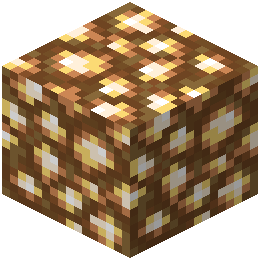 Glowstone
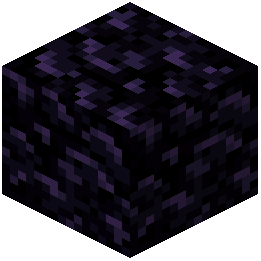 Obsidian
What this pack changes
Every texture group the pack replaces, counted from the pack itself.
| Area | Textures replaced |
|---|---|
| GUI & menus | 20 |
| Blocks | 10 |
| Items | 5 |
| Mobs & entities | 3 |
| Misc | 2 |
| Particles | 2 |
Pack format 64 (Minecraft 1.21.6)42 texture files in total
Extra features
Custom sounds
Custom block/item models
Reworked GUI
Frequently asked questions
Why does my sky look different after installing this pack?
This pack replaces the default sky overlay with a bright anime-themed version that matches the overall visual style. The new sky is designed to stay clear and readable during combat without obscuring your view of enemies.
How do I make my held items smaller on screen?
This pack automatically shrinks held items in your first-person view as part of its default settings. If you want to adjust this further, check your resource pack settings in the Video menu to see if there are customization options available.
Can I use this pack with other resource packs?
Resource packs stack based on their load order in your settings, so you can use multiple packs together—just be aware that overlapping textures from different packs may conflict. If you notice visual issues, try adjusting which pack loads first in your resource pack list.
Why do my swords and crystals look different now?
This pack includes custom textures for swords and end crystals to improve visibility during PvP fights. These redesigned textures are part of the combat-focused aesthetic and make it easier to track items in fast-paced situations.
How do I customize the inventory UI?
The inventory layout comes pre-configured with this pack, but you can modify individual texture files within the resource pack folder if you want to change specific UI elements. Most players find the default layout optimized for quick access during combat.
Does this pack change sound effects?
Yes, this pack includes custom sounds that fit the anime visual theme and are tuned to help with combat awareness. If you prefer the original Minecraft sounds, you can disable sound changes in your resource pack settings or load another sound pack on top.
What's different about the totem of undying?
The totem has been completely redesigned with a custom anime-themed appearance that fits the pack's overall style. It functions exactly the same way in-game, but looks visually distinct from the default totem.
Will this pack affect my FPS during fights?
Resource packs generally have minimal performance impact, but the custom animations and particle effects in this pack may use slightly more resources than vanilla. If you experience lag, try disabling animated textures or particle customizations in your video settings.
Can I use this pack on a multiplayer server?
Yes, resource packs are client-side only, so you can use this pack on any server without affecting other players or requiring server permission. Everyone will see your game with the anime theme, but others will see their own resource packs.
How do I revert to normal Minecraft visuals if I don't like the pack?
Simply unload or delete this resource pack from your resource pack folder and restart your game, or move it below the Default pack in your resource pack list. Your game will immediately return to standard Minecraft textures and sounds.
You May Also Like
Wikis that share the most with this one
Cpvp Miku Nakano Anime Sky Resource PackCpvp Umi Asanagi Anime Sky Resource PackCpvp Waguri Kaoruko Pack Anime Sky Resource PackAlya Pack Resource PackSky Anime Resource PackCubees Anime Saga Pack ModelDark Anime Sky Resource PackToon Cel Anime Style ShadersCpvp Essentials Resource PackAnime Waifu Beds Resource PackAnime Waifu Totem Resource Pack Helpful Cpvp Pack Resource Pack
More resource pack wikis on the site
Cozy Nook Beds Resource PackCozy Bees! Resource Pack Cozy Beds Resource PackCotcotpack Resource PackConsumability Resource PackConsistent Signs Resource PackConsistent Dark Oak Resource PackConquest ReforgedConnected Paths Resource PackConnected Glasses Resource PackComputer Craft Greg Flavored Resource PackComprogrammer Programmer Art Mod Compat Compliation Resource Pack
The most downloaded mods that have a wiki here
A few wikis from each of the other kinds
Gallery
8 images from the Cpvp Alya Kujo Anime Sky Resource Pack page.


