

 DownloadShowcase Item Mod
Get the files on 9Minecraft
Guides
Step-by-step, in-game.
Changing the Showcase KeybindWhy Rebind It Shift + X can clash with other mods or with your own habits. Rebinding the showcase key lets you…How to Showcase an Item in ChatThe Basic Keybind Hover over the item you want to share in your inventory and press the showcase key (default: Shift…Showing Off Items to Other Players on a ServerWhat Others See When you showcase an item, the mod sends a special chat component rather than plain text. Other…Troubleshooting: Showcase Key Not WorkingQuick Checks If pressing the showcase key does nothing, work through these in order. 1. Cursor position: the key only…
Frequently asked questions
How do I showcase an item in chat?
Hover over the item in your inventory and press the showcase keybind (Shift + X by default). The item's name and details will be posted into chat as a clickable, hoverable link.
What does showcasing an item actually do?
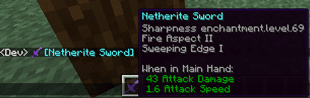
It sends a chat message containing the item's name and icon, and other players can hover over it to see its full tooltip, including enchantments, lore, and durability.
Can other players see the item's NBT data like enchantments?
Yes, the showcased item preserves its tooltip, so enchantments, custom names, lore, and other item data are visible to anyone who hovers over the chat link.
Why does nothing happen when I press Shift + X?
Make sure you're hovering over an actual item in your inventory, not an empty slot, and that no other mod has bound Shift + X to a conflicting action. Check your keybind settings if it still doesn't work.
See all 10 Showcase Item questions ›
Gallery
3 images from the Showcase Item Mod page.


You May Also Like
Wikis that share the most with this one
More mod wikis on the site
The most downloaded mods that have a wiki here
A few wikis from each of the other kinds