

 DownloadCable Tiers
Get the files on 9Minecraft
Guides
Step-by-step, in-game.
Build an automated block placement system with ConstructorSelect your Constructor tier The Enhanced Constructor comes in Elite, Ultra, Mega, and Creative variants. Higher…Create an efficient automated crafting loopUnderstand the Upgraded Autocrafter The Enhanced Autocrafter from Cable Tiers Mod streamlines crafting operations…Set up a high-speed item import systemChoose your tier Decide between Elite, Ultra, Mega, or Creative based on your needs. Elite offers a good balance of…Use the Requester System for automated item logisticsUnderstand the Requester The Requester System allows you to request specific items be delivered to a location…
Recipes
Every recipe the mod adds, grouped by how it is made.
Blocks
388 blocks · showing 24. Browse all →
 Black Creative Autocrafter
 Black Creative Constructor
 Black Creative Destructor
 Black Creative Disk Interface
 Black Creative Exporter
 Black Creative Importer
 Black Elite Autocrafter
 Black Elite Constructor
 Black Elite Destructor
 Black Elite Disk Interface
 Black Elite Exporter
 Black Elite Importer
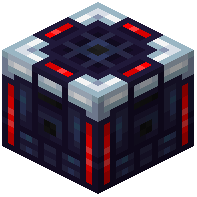 Black Mega Autocrafter
 Black Mega Constructor
 Black Mega Destructor
 Black Mega Disk Interface
 Black Mega Exporter
 Black Mega Importer
 Black Ultra Autocrafter
 Black Ultra Constructor
 Black Ultra Destructor
 Black Ultra Disk Interface
 Black Ultra Exporter
 Black Ultra Importer
Configuration
Every setting in the mod config file, with what it changes.
| Option | What it does |
|---|---|
creativePatternSlotCountCreative Pattern Slot Count | The pattern slot count by the Creative Autocrafter. |
creativeSpeedCreative Speed | The speed of the Creative Autocrafter. |
creativeTransferQuotaMultiplierCreative Transfer Quota Multiplier | The transfer quota multiplier by the Creative Interface. |
eliteEnergyUsageElite Energy usage | The energy used by the Elite Autocrafter. |
eliteSpeedElite Speed | The speed of the Elite Autocrafter. |
eliteStackUpgradeIntegratedElite Stack Upgrade Integrated | If the Stack Upgrade is integrated in the Elite Constructor. |
eliteTransferQuotaMultiplierElite Transfer Quota Multiplier | The transfer quota multiplier by the Elite Interface. |
megaEnergyUsageMega Energy usage | The energy used by the Mega Autocrafter. |
megaPatternSlotCountMega Pattern Slot Count | The pattern slot count by the Mega Autocrafter. |
megaSpeedMega Speed | The speed of the Mega Autocrafter. |
megaStackUpgradeIntegratedMega Stack Upgrade Integrated | If the Stack Upgrade is integrated in the Mega Constructor. |
megaTransferQuotaMultiplierMega Transfer Quota Multiplier | The transfer quota multiplier by the Mega Interface. |
tieredAutocraftersTiered Autocrafters | Configuration for the tiered Autocrafters. |
tieredConstructorsTiered Constructors | Configuration for the tiered Constructors. |
tieredDestructorsTiered Destructors | Configuration for the tiered Destructors. |
tieredDiskInterfacesTiered Disk Interfaces | Configuration for the tiered Disk Interfaces. |
tieredExportersTiered Exporters | Configuration for the tiered Exporters. |
tieredImportersTiered Importers | Configuration for the tiered Importers. |
tieredInterfacesTiered Interfaces | Configuration for the tiered Interfaces. |
ultraEnergyUsageUltra Energy usage | The energy used by the Ultra Autocrafter. |
ultraPatternSlotCountUltra Pattern Slot Count | The pattern slot count by the Ultra Autocrafter. |
ultraSpeedUltra Speed | The speed of the Ultra Autocrafter. |
ultraStackUpgradeIntegratedUltra Stack Upgrade Integrated | If the Stack Upgrade is integrated in the Ultra Constructor. |
ultraTransferQuotaMultiplierUltra Transfer Quota Multiplier | The transfer quota multiplier by the Ultra Interface. |
Frequently asked questions
How do I start with Cable Tiers Mod?
Craft a basic Importer or Exporter using the standard recipes shown in the mod's crafting guide, then place it adjacent to a storage block and a Refined Storage network cable to begin transferring items. You can upgrade to higher tiers (Elite, Ultra, Mega, Creative) as you gather more resources for faster transfer speeds and additional filter slots.
What's the difference between Elite, Ultra, Mega, and Creative tiers?
Each tier increases transfer speed and filter slot count: Elite offers 2x speed with 9 extra slots, Ultra provides 5x speed with 27 slots and an integrated stack upgrade, Mega gives 8x speed with 45 slots and stack upgrade, and Creative reaches 15,000x speed with 45 slots and stack upgrade. Choose based on your performance needs and available resources.
How do I set up an automated import system?
Place an Importer next to your item source (chest, furnace, etc.) and connect it to your Refined Storage network with cable. Configure the filter slots to specify which items to pull, and adjust the transfer rate using the tier you've crafted. The Importer will continuously move matching items into your storage network.
Can I use the Constructor for automatic block placement?
Yes—the Constructor places blocks from your storage network into the world when supplied with power and the correct block type. Higher tiers work faster and more efficiently, making them ideal for large-scale building automation or resource processing chains.
What does the Requester System do?
The Requester System lets you request specific items from your storage network to be delivered automatically, streamlining logistics by eliminating manual retrieval. It integrates with the mod's Importers and Exporters to create a smooth automated supply chain.
How do I create an automated crafting loop?
Connect an upgraded Disk Interface or Autocrafter to your Refined Storage network, set up a Requester to pull in crafting ingredients, and configure the Constructor or Exporter to handle output. Higher tiers process recipes faster, so use Ultra or Mega for demanding production chains.
Do I need stack upgrades for faster transfers?
Stack upgrades are integrated into Ultra, Mega, and Creative tiers and improve transfer efficiency by moving larger quantities per operation. If you're using Elite tier, you won't have this benefit built-in, but higher tiers automatically include it.
Can I use multiple Importers and Exporters on the same network?
Yes—you can chain multiple Importers and Exporters together on a single Refined Storage network to handle different item types or sources simultaneously, allowing for complex multi-stage automation setups.
What happens if I don't configure filter slots?
Without filter configuration, Importers and Exporters will attempt to transfer all items, which can clog your network or cause unintended behavior. Always set up filters to specify exactly which items should move through each device.
Is Cable Tiers Mod compatible with other Refined Storage addons?
The mod is designed to work alongside Refined Storage and RSRequestify, and generally integrates well with other addons that use the same cable and network system. Check compatibility with specific mods on community forums if you encounter issues.
Gallery
12 images from the Cable Tiers Mod page.


You May Also Like
Wikis that share the most with this one
More mod wikis on the site
The most downloaded mods that have a wiki here
A few wikis from each of the other kinds