
Prominence Of Minecraft Resource Pack Wiki

Prominence Of Minecraft Resource Pack Wiki & Guide
wiki.9minecraft.net/prominence-of-minecraft-resource-pack/
The community wiki and guide for Prominence Of Minecraft Resource Pack.
Guides
Step-by-step, in-game.
Building and Decorating with Updated Block TexturesBlocks Receive Richer Colors and Details The resource pack touches nearly every block in the game, adding richer…Exploring Dimension-Specific Block ChangesNether Blocks Get a Cleaner Look The Nether dimension receives notable visual updates through this resource pack.…Recognizing Updated Mob and Character TexturesClassic Creature Designs Return This resource pack brings back classic textures for several iconic mobs. Cows,…Understanding the Updated Interface and HUDWhat Changed in Your Menus The resource pack replaces your standard interface with warmer, more detailed visuals…
Frequently asked questions
How do I know if the resource pack is working?
Load into a world and check your inventory screen — it should have a warm yellow-gray tint instead of the default gray. Look at your hotbar and health display at the bottom of the screen; the icons should be more detailed. If blocks like 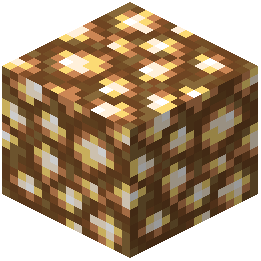 glowstone appear brown instead of yellow-green, the pack is active.
glowstone appear brown instead of yellow-green, the pack is active.Do the texture changes work in the Nether?
Yes. 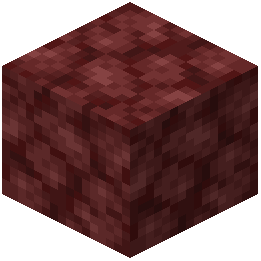 Netherrack has been reworked for a cleaner appearance, and glowstone blocks now use softer brown shades instead of the bright yellow-green. The entire Nether dimension receives updated textures alongside the rest of your world.
Netherrack has been reworked for a cleaner appearance, and glowstone blocks now use softer brown shades instead of the bright yellow-green. The entire Nether dimension receives updated textures alongside the rest of your world.Will mobs look different with this pack?
Yes. Cows, spiders, and zombie pigmen have been restored to classic designs. Zombies and Steve now wear casual pink shirts with khaki pants, and zombies have brown hair added to match Steve's hairstyle.
Can I use this with other resource packs?
Resource packs stack in order of priority, so if you load another pack after this one, its textures will override Prominence textures. Load Prominence last in your resource pack list if you want its changes to take priority.
See all 10 Prominence Of Minecraft questions ›
You May Also Like
Wikis that share the most with this one
Tierify Prominence II Tweaks Data PackArtifact Protection Prominence II Data PackSpell Enchants for All Prominence II Data PackSpellblades N Such Unlimited Temp Fix for Prominence II Data Pack Loot Tweaks for Artifacts Utility Datapack for Prominence II Data PackCreate Style Sophisticated Backpacks 9minecraft Resource PackIconsAcatarExcaliburFaithlessStay TrueTlauncher
Loot Tweaks for Artifacts Utility Datapack for Prominence II Data PackCreate Style Sophisticated Backpacks 9minecraft Resource PackIconsAcatarExcaliburFaithlessStay TrueTlauncherWikis on the same theme: cat
Fat Cat Resource PackFat Cats Resource PackOre Grids Resource PackXray Java Resource PackHalf Sized Resource PackSmart Boost Resource PackCat Creepers Resource PackCatgirl Beds Resource PackX-Ray Vision Resource PackCatppuccin UI Resource PackRealistic Cats Resource PackBlockception Full Resource Pack
More resource pack wikis on the site
Programmer Art x Fresh Animations Resource PackProgrammer Art Panorama Resource PackProgrammer Art Fix Resource PackProgrammatic Command Blocks Resource PackPrivate’s Skies Resource PackPristine Vein Deposits Resource PackPrismic Patterned Depth Resource PackPrismatic Aura Sparkle Resource PackPrismatic Atmosphere Resource PackPrism Glyph Standard Resource PackPrimes Hd Textures Free 32X Resource PackPrimal Horizon Shifters Resource Pack
The most downloaded mods that have a wiki here
A few wikis from each of the other kinds