

 DownloadPig Pen Cipher Mod
Get the files on 9Minecraft
Guides
Step-by-step, in-game.
How to Build a Pig Pen Cipher Puzzle for Other PlayersDesigning the Puzzle A good cipher puzzle gives players the encoded message plus a way to find the key. Start by…How to Make Custom Signs and Books with Cipher SymbolsWhere the Font Applies Because the mod registers the cipher as a font rather than a block or item, it works in every…How to Read and Write Pig Pen Cipher Messages in MinecraftUnderstanding the Grid Key The Pig Pen Cipher maps each letter of the English alphabet to a shape drawn from a grid.…How to Send Secret Messages to Friends Using the Pig Pen CipherWhy Use It for Messaging Since the cipher is a substitution font, your encoded text looks like scrambled symbols to…
Frequently asked questions
How do I actually get the Pig Pen Cipher to show up in Minecraft?
The mod doesn't add its own items or commands; it registers a font that other mods load on demand, so you won't see anything until something requests it. In practice,  Dark Utilities is what pulls the font in, so install that alongside this mod and the cipher becomes available wherever text is rendered.
Where can I use the cipher once it's loaded?
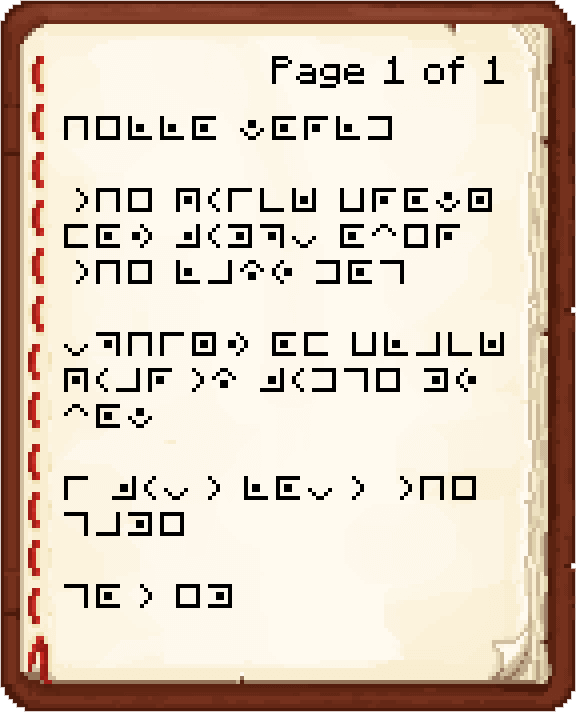
Anywhere the game renders text: books and written pages, signs, chat messages, item names, and tooltips. If a piece of text supports the cipher font, you can type the cipher characters and they'll display as pig pen symbols.
How do I type the pig pen symbols on my keyboard?
You don't type them directly — the cipher is a font, so you type the normal letters and the font swaps the glyphs for the corresponding pig pen shapes. That means A becomes the corner shape, E becomes the square, and so on, without any special keys.
What's the key for the cipher? I keep forgetting which shape is which letter.
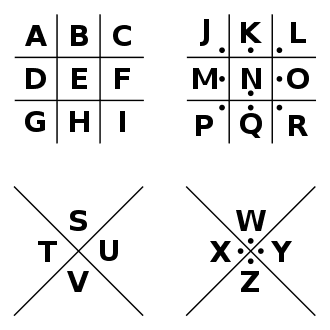
The key is a tic-tac-toe style grid: the first nine letters (A–I) fill the nine cells of the grid, and the next nine (J–R) fill a second grid drawn with dots in each cell. The last letters (S–V) go in an X shape and W–Z go in an X with dots, so a dotted version of a shape means the letter from the second set.
See all 10 Pig Pen Cipher questions ›
Gallery
3 images from the Pig Pen Cipher Mod page.
You May Also Like
Wikis that share the most with this one
More mod wikis on the site
The most downloaded mods that have a wiki here
A few wikis from each of the other kinds