

Find the grave
When you die, the mod places a 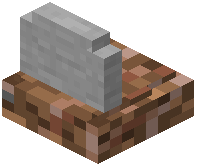 grave block at or near your death location and moves your inventory into it. Head back to where you died. The grave is usually a distinct stone marker, so scan the ground for a block that does not match the terrain. If you died in lava, a void, or another spot where a block cannot sit, the grave may be placed at the nearest valid position, so check the surrounding area rather than the exact death tile.
Open and loot it
Walk up to the grave and interact with it (right-click or your platform's use control). This opens a container interface showing the items that were stored. Move everything back into your inventory, or shift-click to transfer it all at once. Once the grave is emptied, it typically disappears or becomes breakable, so you can clean it up.
If the grave is missing
If you cannot find a grave, your inventory may have dropped normally instead, which happens when the mod's grave feature is disabled or when the death type bypasses it. Check your game rules and mod config for the grave-on-death option. Also confirm you are looking in the right dimension, since a grave stays in the dimension where you died. Keeping coordinates of your death point makes recovery far faster.


