

 DownloadNet Music
Get the files on 9Minecraft
Guides
Step-by-step, in-game.
Fixing the Net Music Mod When Nothing WorksThe most common search around this mod is that it is not working. Almost every failure traces back to one of a few…How to Play Music CDs in the Music PlayerOnce you have a written Music CD , the Music Player is what actually plays it back for you while you move around.…How to Set Up the Computer and Burn Your First Music CDThe Computer and CD Burner are the core of the Net Music mod's workflow. You need both blocks placed and powered…How to Store and Carry Your Music Player with the BackpackThe Music Player Backpack lets you keep your player and discs organized and on your back instead of scattered across…
Recipes
Every recipe the mod adds, grouped by how it is made.
Items
 Music CD
 Music Player Backpack
Blocks
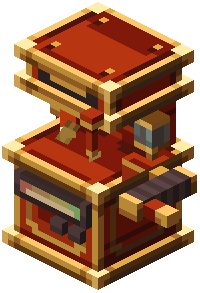 CD Burner
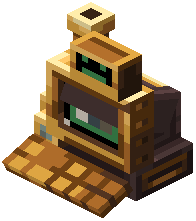 Computer
 Music Player
Configuration
Every setting in the mod config file, with what it changes.
| Option | What it does |
|---|---|
enable_maid_lyricsEnable Maid Lyrics | Whether to enable lyrics display for the maid |
enable_netmusic_cd_generationEnable NetMusic CD Generation | Whether NetMusic CDs can generate inside mob backpacks |
enable_player_lyricsEnable Player Lyrics | Whether to enable lyrics display in the music player |
enable_stereoEnable Stereo | Whether stereo playback is enabled |
enable_vip_netmusic_cd_generationEnable VIP NetMusic CD Generation | Whether VIP NetMusic CDs can generate inside mob backpacks (VIP CDs cannot be played) |
general | General Settings |
original_maid_lyrics_colorOriginal Maid Lyrics Color | The color of the original lyrics for the maid, in #ARGB format |
original_player_lyrics_colorOriginal Player Lyrics Color | The color of the original lyrics in the music player, in #ARGB format |
proxy_addressProxy Address | Proxy Address, such as 127.0.0.1:1080, empty is no proxy |
proxy_typeProxy Type | Proxy Type, http and socks are supported |
sophisticatedbackpacks | SophisticatedBackpacks Compatibility |
translated_maid_lyrics_colorTranslated Maid Lyrics Color | The color of the translated lyrics for the maid, in #ARGB format |
translated_player_lyrics_colorTranslated Player Lyrics Color | The color of the translated lyrics in the music player, in #ARGB format |
Frequently asked questions
How do I start with the Net Music Mod?
Craft a Computer first, place it down, and interact with it to open its interface. From there you can browse and select music, then use a CD Burner to write tracks onto a blank Music CD.
How do I burn a music CD in Net Music Mod?
Put a blank Music CD into the CD Burner and use the Computer to pick the tracks you want written to it. Once the burn finishes, the CD holds those songs and can be played anywhere.
How do I play a music CD?
Craft a Music Player and insert a burned Music CD into it. The player then plays the tracks on that disc, and you can carry it with you while you explore.
How do I carry my music player around?
Craft the Music Player Backpack and put your Music Player inside it so it stays with you. The backpack gives the player portable storage so you don't have to hold it in your hand.
Net Music Mod not working, what should I check?
Make sure the Computer has power or is placed correctly and that the CD Burner is adjacent or linked as the mod requires. Also confirm the Music CD is blank before burning and that the disc is actually inserted into the player.
Why won't my music CD burn?
The disc must be blank and the Computer must have a track selected to send to the CD Burner. If the burner isn't connected to the computer or the disc already has data, the burn will fail.
Can I play my own music files with this mod?
The mod is built around its own music system, so you work with the tracks the Computer offers rather than importing arbitrary audio files. Check the configuration section of the wiki for any options that affect what music is available.
Does Net Music Mod work on a server?
It can run on a server, but music playback and the Computer interface are handled per-player, so each player needs their own Music Player and discs. Make sure the mod is installed on both client and server to avoid desync issues.
Net Music Mod is laggy or causing performance issues, how do I fix it?
Too many Music Players or Computers running at once can add load, so limit how many are active in one area. If problems persist, check the configuration file to reduce music-related processing or disable features you don't use.
What's the difference between the Music Player and the Music Player Backpack?
The Music Player is the device that actually plays a Music CD, while the Music Player Backpack is storage that holds the player so you can carry it hands-free. You still need a Music Player inside the backpack for music to play.
Gallery
9 images from the Net Music Mod page.


You May Also Like
Wikis that share the most with this one
Wikis on the same theme: backpack
More mod wikis on the site
The most downloaded mods that have a wiki here
A few wikis from each of the other kinds