

 DownloadBotany Pots Mod
Get the files on 9Minecraft
The mod adds two primary functional blocks, each available in numerous aesthetic variations.
Botany Pot
The standard 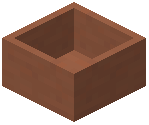 Botany Pot is the foundation of the mod. It allows for the growth of a single plant. To use it, a player must place a valid soil block inside, followed by a seed or sapling. Once the plant reaches maturity, it can be harvested by right-clicking the pot. The plant will then reset to its initial growth stage, provided the soil remains.
Hopper Botany Pot
The 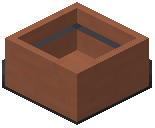 Hopper Botany Pot is an upgraded version of the standard pot. It functions identically in terms of growth but features an integrated automation system. When a plant reaches maturity, the Hopper Botany Pot will automatically harvest the crop and attempt to deposit the items into an inventory (such as a chest or barrel) located directly beneath it. This allows for completely hands-free farming.
Aesthetic Variations
Both the standard and Hopper versions come in the following styles:
- Terracotta: The default brownish-orange look
- Dyed Colors: All 16 Minecraft colors (White, Orange, Magenta, Light Blue, Yellow, Lime, Pink, Gray, Light Gray, Cyan, Purple, Blue, Brown, Green, Red, Black)
- Glazed: Decorative patterns corresponding to glazed terracotta colors


