Making A Town
Required:
Items & Blocks.
Building A Structure In Depth.
Expressions & Generation Logic.
Structure Script Block.
Making A Maze.
Structure Types.
Towns, like labyrinths, use the maze generator, but in a different way. The basic concept of a town is that maze rooms become neighborhoods and buildings themselves are generated on lots. Neighborhoods are essentially maze rooms that are just sections of land open to the sky. Lots are designated areas inside neighborhoods with structure script blocks that generate the actual buildings in your town. This system allows the layout of the town and the placement of buildings to be completely randomized. Unlike a labyrinth, towns generate on the surface and typically also have things like walls around them or sections within the maze bounds that are part of the parent structure. Because it's generating on the surface, the parent structure of the town is also given a base of flat land to generate on and tapering underneath to terrain blend.
The first step to creating a town before you start creating the layout is to design its concept. You may want to find answers to these steps in order:
- Concept: What do you want the town to feel like? What type of people, or even species, lives in it? What's the cultural background of its inhabitants? If you want to go in-depth, what events occurred in their pasts, what religion formed them, and what's their cultural hierarchy?
- Geography: What type of terrain does the town usually occur in? How have the people adapted to their surroundings?
- Composition: What types of 'neighborhoods' or special sites does your town have? How far does it reach out? After you are done designing, you should have a good idea of how your towns generally look, and what design rules you'd have to look out for when building one. These questions can help with deciding on a build style, aesthetic, block palette, etc.
When it comes to designing the layout of a town, similar to labyrinths, there is really no restriction to what you can do with it. Your town could have walls, or not. It could be medieval with houses and a castle in the middle, it could be cyberpunk themed with tall buildings, or even nature themed with tree houses and bridges spanning multiple floors. You can make it any shape, underground, a set of floating islands connected by bridges, or even make something that's not a typical town; a ruined dynamic castle for example. The only thing that separates towns from labyrinths is that most rooms have a structure generator block, and the rooms themselves don't usually have walls.
Creating the layout for a town is similar to the process for a labyrinth, but with two differences. Due to neighborhoods needing to line up properly with adjacent neighborhoods without looking weird, I find it best to build towns physically laid out in the world and then export each room/ neighborhood afterwords. This ensures that your paths and features along corners blend in with nearby neighborhoods and hides the borders of the rooms.
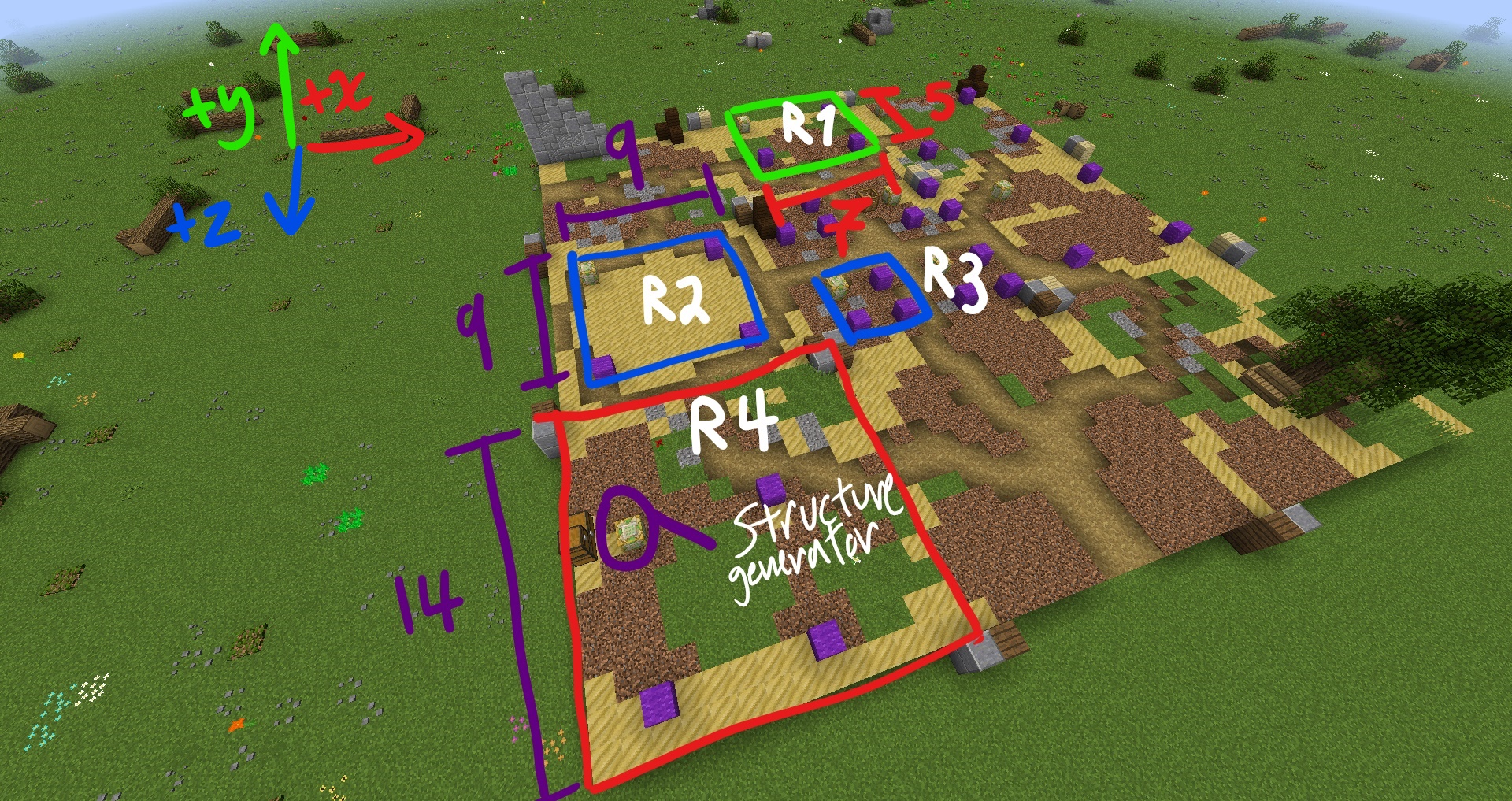
The second difference is needing to outline plots of land for where your buildings are going to go. Structure blocks are going to be placed here to generate your buildings to add more randomization to your town, so you need to decide on a size and design your neighborhoods around your lot placements. Remember that structure scripts generate outwards in the positive axis, so without offset, you'll need to place your structure blocks in the bottom corner that points towards positive X and Z. Here is an example of the physical layouts I usually use (with each neighborhood marked with andesite and wood for exporting later, and lots marked with purple wool):
 \
\
Before getting into "lots" more, I'll cover neighborhood planning in detail so that we're properly familiar with it. When planning your neighborhoods, you'll have to consider the placement of roads/ paths through the neighborhoods and how they'll connect to your buildings. The shape and size of your neighborhoods will determine where in your town they will generate, since the exits of each neighborhood would have to match up to adjacent neighborhoods (see Making A Maze for a refresher). While the examples I'm using here all use a very basic square neighborhood shape, you could do asymmetrical shapes too:
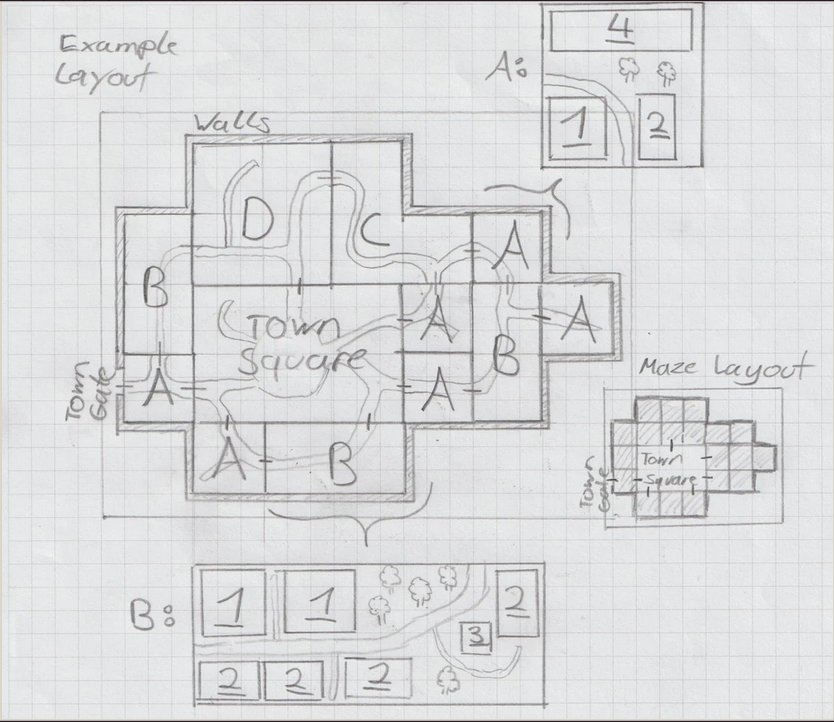
In the above example layout, there are four different rooms. The neighborhoods A through D. In this example, room A is equal to the maze's component size for this town. You can see that A generates most frequently due to its size fitting anywhere, and room C only generated once because it requires very specific conditions to generate to both fit in a bend and match up its 3 exits. Now even though these neighborhoods have very irregular shapes, you can see that within each component of a room, an exit is always exactly centered, allowing all the neighborhood's streets to seamlessly match up. In this example, the town square is actually part of the parent structure and not part of the maze, guaranteeing that it always generates (although you could make the town square a room too and use connector rules to force it to generate). Now, while allowing rotation and randomized placement does improve the dynamic layout of your town, you could even use connector rules to force the placement of certain neighborhoods, and then have a sort of group system where you have multiple variations of those neighborhoods to generate in their designated locations. While this somewhat limits the layout of your town, it does allow for more elaborate designs since the placement of the rooms is more predictable.
Anyway, now that you're properly familiar with neighborhoods, you can see the importance of planning plot locations relative to the paths and the other decorative elements. The generation pools you give to your neighborhood can be separated by neighborhood, by plot groups, by neighborhood type, etc. It depends entirely on how you want to plan your buildings. Other than style limits, your structure pools will also be limited by the building shapes. In the above town example, the blue outlines indicate the bounds of the buildings that can generate their. Because they are different sizes, each has its own pool of structures that can fit in their lots. For asymmetrical buildings, such as the green lot R1, you'll have to either disable structure rotation in the script block or build the lot in such a way that it extends beyond the actual bounds of the building to account for the different facings. Otherwise you'll end up with some orientations cutting into nearby structures.
For an example of structure pool layouts, you can see the above town blueprint showing a blown up illustration of neighborhoods A and B, with varying lot sizes each represented by their own structure pools numbered 1 through 4.
Now that all your planning is done, you can build your parent structure on top of a ground base large enough for your entire town to sit on (complete with any walls, hills, etc you may want to include), set up your maze rules, and construct your neighborhoods and structures for your lots. For randomized lots, you use the structure pool name in the structure script blocks and then configure the rest of your settings. All of this and maze setup is covered in the pages listed as prerequisites at the top of this page. For an example on constructing a town from start to finish, you can see the towns (remember to put the link here) example in the index.
Due to the way mazes generate, certain spaces within a maze's bounds may not always fill with rooms. Once all exits designated by the rules have been connected, maze generation will stop, leaving potential gaps of flat empty ground. There are two ways to go about fixing this.
Default Space:
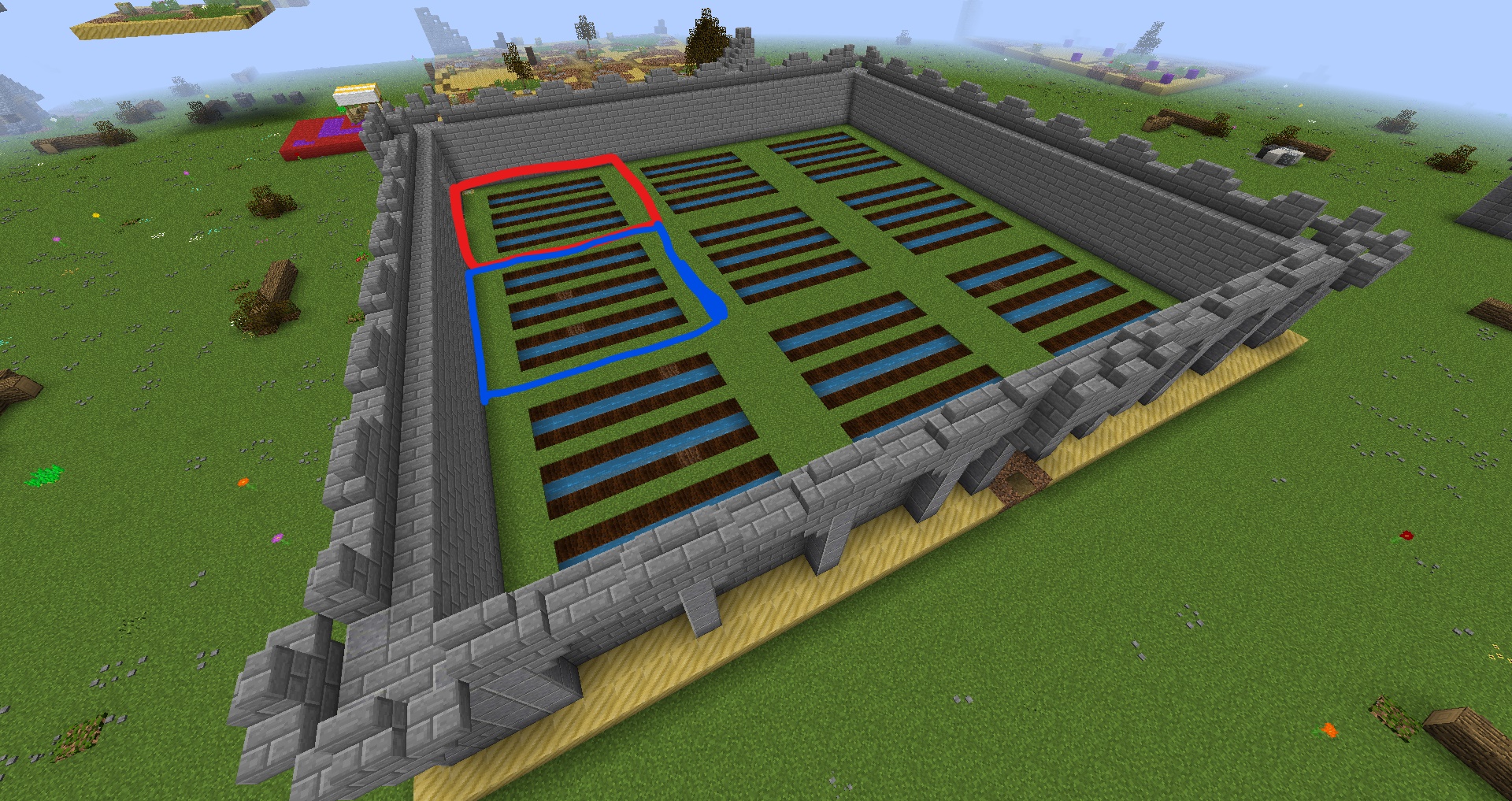
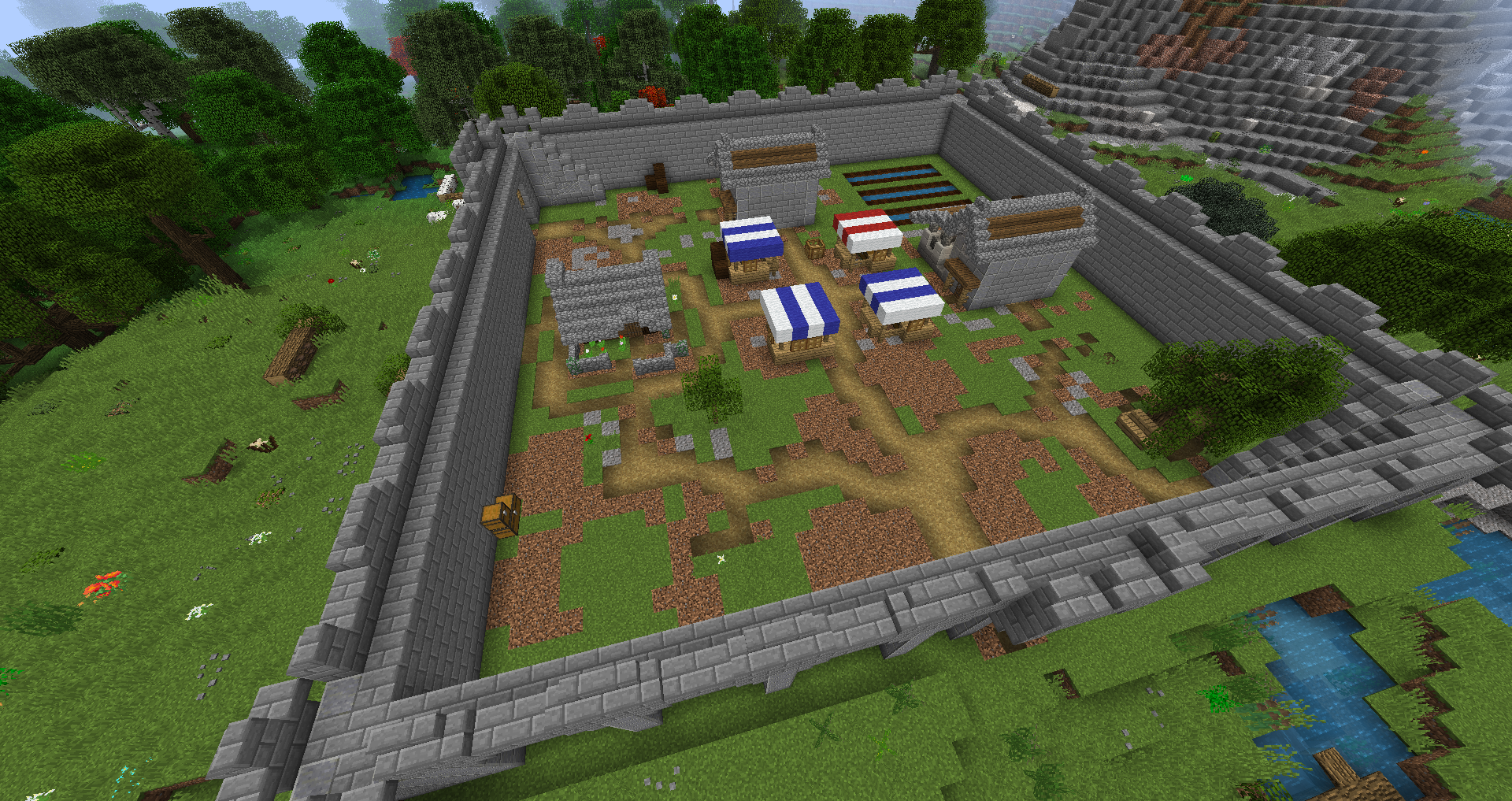
This is the concept of filling in the interior of your town in the parent structure with decorations and/ or structures that will get overwritten by the neighborhoods when the maze generates. The idea is to have something act as a stand in for missing rooms while blending into the town. If using this method, make sure the content you add to your town's interior doesn't exceed the height of your rooms, or else you'll get weird floating blocks. What you add is up to your imagination. Some suggestions could include; vegetation growing through broken street stone; abandoned ruined houses; natural looking terrain; park areas with flowers and benches. In the below example I went ahead and used farmland as the placeholder (note that the farmland is placed within the bounds of the rooms that might generate over them). You can see a working example of a missing lot where the farmland shows:
 \
\
Better Connection Rules:
The second method is to use connection rules within your maze script block to force all lots to get filled by rooms. Whether or not it will actually work will depend on the shape of your town and the placement of its exits, so you'll need to do some experimenting.
The idea is to have dummy exits along the edges of your town, and then setting your maze to "connect all" for pathing rules to the exits. Most of these fake exits would lead directly into the walls of your town and wouldn't go anywhere, but would force rooms to generate connected to them. Space a few of these in areas you're noticing with frequent missing neighborhoods and it will force your town to fully generate. If having roads leading into your walls bothers you, you can instead lead them inwards into a town square, castle, etc. The idea is to have a section of your maze generator excluded and have exits pointing into it, forcing rooms along its border. You can play around with exit placement and layouts until you find something that works.
While it is best to have a slab of terrain blending land as part of your parent structure for your town to sit on so it integrates into your terrain properly, there is no reason you must keep it flat in your town. You could totally create different elevations inside. It is arguably easier to create man-made looking raised ground with short walls marking the change in elevation, but natural sloping ground is possible too. The catch is that you'll need to have neighborhoods designated to generate in a specific portion of your town and have gendered connector rules to orient them properly. Raised neighborhoods would need to only generate near other raised neighborhoods, while "transition" neighborhoods generate between these and the ones with normal elevation (this avoids sudden boxy cuts and guarantees a smooth transition. Think of these like hill edge biomes which smooth out the transition between extreme hills and plains). Note that this sort of thing requires a lot of space, so make sure your town has a large enough component count size (at least 7x7), and you don't have too many extra large neighborhoods. Alternatively, you could also use extra large neighborhoods and have the raised terrain entirely contained within it so you don't have to worry about border matching and smooth transitions.
This brings us to the next topic, which is neighborhood placement rules and "districts." Districts can be thought of as neighborhoods on a macro scale that comprise several neighborhood rooms, and is achieved using gendered connection rules to force certain rooms to always generate next to each other. This can be used to do things like having rich portions of your city in one section, poor locations in another, etc. Or for things like making sure moat rooms always generate adjacent to your large castle room to surround it, and having a drawbridge room always generate at the castle's gate (where an exit would be designated). You could even do things like having a chain of small rooms that's actually a river that generates through town, with connector rules making sure the river rooms generate with proper orientation. If you have several river neighborhoods set to only connect to other river neighborhoods, you could then have a "river end" room to randomly cut it off. If the river is treated like a valid path with two exits (you'll probably want straights and bends), it will generate snaking along until the end room generates and stops it. You could even add some bridges over them which are allowed to connect to regular neighborhoods so that the river doesn't cut off sections of your town, and encourages more dynamic generation. If you want to see an example of this river feature, you can see an example here (add link).
The last thing to note about towns is to remember that maze rooms and structure generators have no vertical limit. So while you might be limited horizontally, there's nothing stopping you from making a tall tower or castle or scifi building in your town. In fact, you could even make these dynamic structures for further variety, such as randomizing their floors. Dynamic structures are covered here.