Custom Npc Through Rc
Required:
Items & Blocks.
Expressions & Generation Logic.
Building A Structure In Depth.
How To Use CustomNPC.
How To Use DefaultWorldGenerator-Port.
This guide will show you how to get CustomNPC's NPC (CNPC) to appear in Recurrent Complex structures that generate in your world. To do this, you'll also need the DefaultWorldGenerator-Port mod (DWG). I'll be using the acronyms going forward because I'm too lazy to type that out every time. This guide is relevant only to those who are making a modpack in which you want the NPC to appear in new worlds, as with servers the data is already saved there.
So first off, for those unfamiliar with how CNPC stores its files (and what makes this process necessary), CNPC stores all NPC dialogue and quest data within the worlds in which the NPC was created (i.e the save folder). This is because the nbt data of an NPC doesn't actually contain these, but rather references to them via a folder number that corresponds to the dialogue/ quest's ID. So where is the info for these actually stored? In Json files within the /customnpc/dialogue/ and /customnpc/quests/ folders inside your worlds. So if you have an NPC in your structure, export it, and then make a new world where that structure generates; the only data you'll get on the NPC will be their stats and skin. They won't have any dialogue or quests.
Now you may have noticed that there is also a customnpc folder in your root instance folder. This folder only stores serverside clones, which will come in later. The point of all this is that for NPC to have all their data loaded properly, it needs to be injected into the save folder of new worlds as soon as they're created. And that's where DWG comes in.
So to start off, create a structure and place your NPC inside. Set up any dialogues, quests, behavior, etc that you want them to have. You must disable the AI option "return to start," as this will cause the NPC to bug out and teleport to the coordinates 0,0,0. Since they won't be returning to start, allowing them to wander might also be a bad idea depending on your structure. It is recommended that your structure enclose or block the NPC in some way to prevent them from wandering off. Note that NPC inside structures can not have any pathing assigned to them, as this also causes them to break.
Then, create a client side clone of your NPC, and export your RC structure. Now go to /saves/worldName/customnpc and copy the folders inside named quests and dialogue to your desktop. Then go into /config/defaultworldgenerator-port/ and inside create a folder named whatever you want (This is your DWG profile folder. For the purpose of this guide I'll call it npcDataProfile). Then inside this custom folder create one named exactly "customnpc." Inside this customnpc folder, place the folders you copied to your desktop earlier. Now go to /customnpc/ in your instance directory and copy the clones folder and paste it into /config/defaultworldgenerator-port/npcDataProfile/customnpc/ as well.
Next, load up Minecraft and click on the "mods" button to see all loaded mods. Look for defaultworldgenerator-port and click "config." Here you can set up DWG profiles to do things like restrict certain settings to force them when a player creates a world, setup templates, and apply DWG datapacks for file injection.
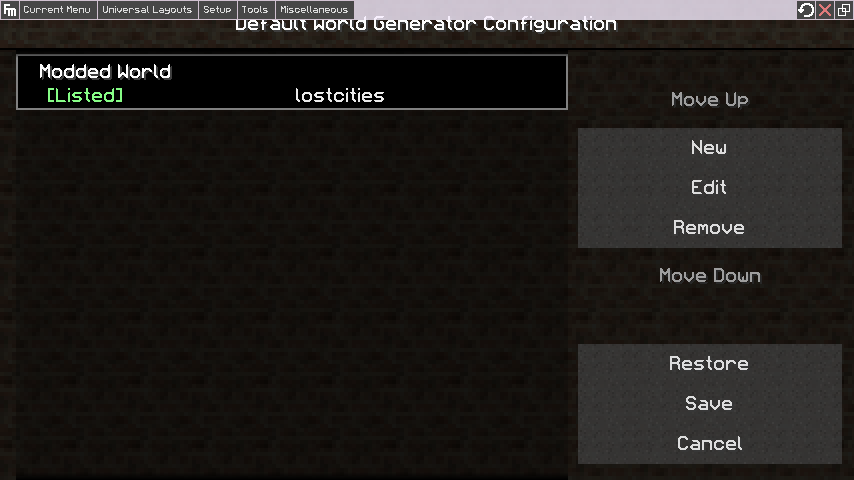
In this window, you'll want to select "new" to create a profile, and then look for the button "data files."
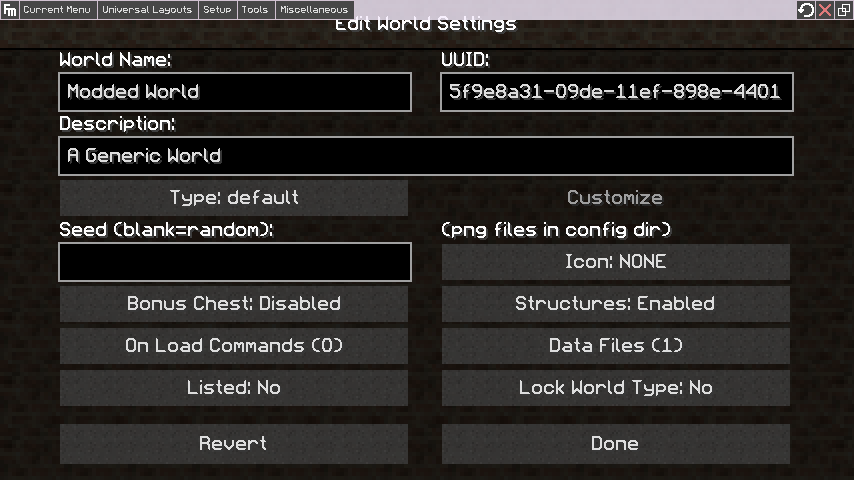
Inside here, type the name of your data folder (e.g npcDataProfile) into the text box and click "add," and then select it from the entry list. At this point you can also configure any other settings in the profile window if you'd like, or just leave them as default. If you do create a strict profile (lock world type: "true"), make sure to create another default profile afterwards (for testing/ super flat/ whatever), because with DWG installed, you can only create worlds from these saved profiles. Remember to hit save and enable this profile by selecting "yes" for the "listed" option.
Now, due to the way this works, any time you edit an NPC from a structure, you will need to re-do this entire process (minus the setting up of the DWG profile). This means editing the NPC, cloning it, exporting the structure, and copying the folders over again (you don't actually need to copy the entire dialogue and quests folders every time. if you know their IDs for the ones you edited, you could go inside and just copy those. If doing this though, keep track of every window you edit to make sure you don't skip any!). For this reason I recommend having a "build" world where you have all your structures out so you can finish any edits, cross NPC interactions, etc or come back and edit them if needed. You can always import the structure for the NPC you want to edit and then export from that world (as long as the exported data is up to date of course), but remember that you need to copy over from the save folder of the world in which you did the editing! I prefer to use one world so I don't get confused and accidentally overwrite my work. Whichever you choose, keep incremental backups of your DWG profile folder and build world! That way if you accidentally overwrite something, you don't lose all your hard work.
A note on unique NPC. For those that know, you can control under what conditions dialogue for an NPC appears, and it can be dependent on quests or dialogues from other NPC, etc.
In the case of structures that spawn randomly, and thus more than once, if you have an NPC that has such conditions, then it will be shared by all NPC that spawn from this structure. E.g if a merchant named Twisted Dave only talks to you after completing a fetch quest Dave's Goods, but before talking to Trader Mike, then if you've already talked to the trader every single Twisted Dave you come across will no longer talk to you even if you've met the conditions for the fetch quest. Since NPC point towards the resource location of quests and dialogues instead of storing them within themselves, all instances of a given dialogue/ quest ID are identical. Since they are literally clones, their dialogue conditions are shared. So this, along with the fact that it would be really weird to come across multiple clones of the same unique NPC, may cause you to only want one of them to appear in a given world. For this, you will have to use "static generation" for the structure so they only appear once (you could use random generation with a structure count "Limit", but then you'd need to figure out a method for making their location semi predictable, otherwise players would likely never find them). I prefer to give NPC that appear multiple times generic names and dialogue that would make sense to encounter more than once, and unique names and dialogue to NPC in unique structures. This is just a design preference and is up to the dev, but keep in mind the side effects mentioned above.