
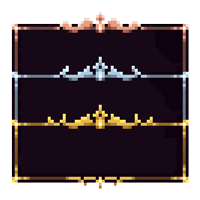
 DownloadEclectic Trove Resource Pack
Get the files on 9Minecraft
First Checks
If no borders appear at all, the most common cause is a missing dependency. Eclectic Trove requires  Legendary Tooltips to work. Confirm Legendary Tooltips is installed for the same mod loader and game version as your other mods, and that it loads without errors.
Resource Pack Selection
1. Open Options, then Resource Packs.
2. Check that Eclectic Trove is in the selected (right-hand) list, not just available on the left.
3. If another pack also modifies tooltip frames, move Eclectic Trove above it so its textures win.
4.
Config and Reload Issues
- If borders show for some items but not others, your Legendary Tooltips config likely has no rule for those items. Add entries or enable the automatic preset.
- If you edited the config and nothing changed, reload configs in-game if your setup supports it, otherwise restart the game.
- If borders appear but look like the vanilla default, the pack may be loading below another pack that overrides the same textures.
Still Not Working
Check the game log for errors mentioning Legendary Tooltips or the resource pack. A single broken file can stop the whole pack from applying, so re-downloading a fresh copy of the pack often resolves stubborn cases.
More guides for this mod
How to Change Which Border an Item Uses in Eclectic TroveHow to Pick the Right Frame Style for Different Item TypesHow to Use the Automatic Setup Option in Eclectic Trove


