Core Mechanics
Research Synchronization
The plugin's most significant mechanic is its adherence to the player's research progress. Unlike standard NEI recipes, Thaumcraft recipes are dynamically hidden. If a player has not yet completed the required research for an item (e.g., Nitor or Alumentum), searching for that item in NEI will not display its recipe until the research note is completed and consumed.
Scanning Integration
The Aspect "Usage" system is tied to the player's scanning history. When looking up what items contain a specific Aspect, the plugin only displays items that the player has successfully scanned with a Thaumometer. This encourages active exploration and world interaction.
Recipe Overlay
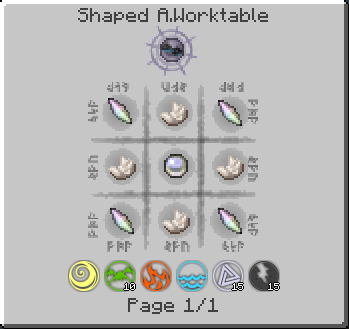
For the Arcane Workbench, the plugin provides a ghost-image overlay. By clicking the [?] button in the NEI recipe view, players can see exactly where items need to be placed in the 3x3 grid.
Recipe Handlers
The plugin adds custom handlers for the three primary tiers of Thaumcraft crafting:
| Recipe Type | Description | Displayed Information |
|---|---|---|
| Arcane Workbench | Traditional 3x3 crafting using a wand. | Shows the item grid and the specific Vis cost for each of the six Primal Aspects. |
| Crucible | Alchemy-based crafting in a boiling cauldron. | Displays the catalyst item and the exact amount of Essentia (Aspects) required in the water. |
| Infusion | High-tier ritual crafting on an Altar. | Shows the central item, pedestal items, and the Instability Level of the ritual. |
Wand and Staff Crafting
The plugin specifically handles the dynamic recipes for Wands, Staffs, and Scepters. It calculates the total Vis cost based on the rod and caps used, displaying them accurately in the Arcane Workbench handler.