

What this pack changes
Every texture group the pack replaces, counted from the pack itself.
| Area | Textures replaced |
|---|---|
| Items | 54 |
| Tools | 42 |
| Models | 31 |
| Blocks | 27 |
| Items | 19 |
| Blocks | 18 |
| Armor | 16 |
| Mobs & entities | 1 |
Pack format 9 (Minecraft 1.19)208 texture files in total
Extra features
Custom block/item models
Guides
Step-by-step, in-game.
How to Enable Glowing Ore Blocks and ItemsHow to Fix Missing Tool Animations and ModelsHow to Set Up Custom Armor DisplaysHow to Unify Modded and Vanilla Gear Textures
Items
A
 Amethyst Shard
C
 Chainmail Chestplate
 Chainmail Helmet
D
 Diamond Axe
 Diamond Chestplate
 Diamond Helmet
 Diamond Hoe
 Diamond Pickaxe
 Diamond Shovel
 Diamond Sword
G
 Golden Axe
 Golden Chestplate
 Golden Helmet
 Golden Hoe
 Golden Pickaxe
 Golden Shovel
 Golden Sword
I
 Iron Axe
 Iron Chestplate
 Iron Helmet
 Iron Hoe
 Iron Pickaxe
 Iron Shovel
 Iron Sword
L
 Leather Cap
 Leather Tunic
N
 Netherite Axe
 Netherite Chestplate
 Netherite Helmet
 Netherite Hoe
 Netherite Pickaxe
 Netherite Shovel
 Netherite Sword
S
 Shears
Blocks
 Amethyst Cluster
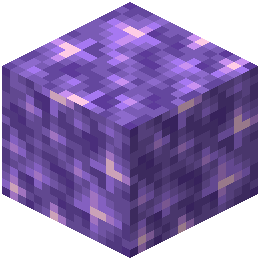 Block of Amethyst
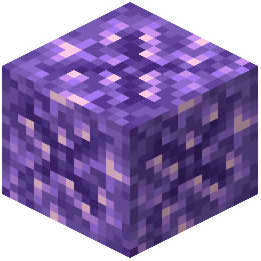 Budding Amethyst
 Large Amethyst Bud
 Medium Amethyst Bud
 Small Amethyst Bud
Frequently asked questions
Why aren't the ore blocks and items glowing in the dark?
Glowing textures require OptiFine to render properly in dark areas. Make sure you have OptiFine installed and that emissive textures are turned on in your video settings.
Which ore mods are compatible with this resource pack?
The pack supports equipment and blocks from More Ores In ONE, Enderite Mod, EmeraldExtended, and Amethyst Equipment. Installing these mods alongside the pack gives their items custom textures and animations that match your vanilla gear.
Do I need to install those ore mods to use this pack?
No, the pack works in a purely vanilla game by restyling standard tools, weapons, and armor sets. The modded textures will simply stay unused unless you have the corresponding mods installed.
Why did my leather and chainmail armor completely change styles?
This resource pack intentionally remodels vanilla armors into distinct outfits. Leather armor is redesigned into a dark ninja combat suit, chainmail becomes a tailored fencing uniform, and golden armor gets a polished look meant for display rooms.
Why are my swords and pickaxes not moving or animating?
If your tool and weapon surfaces are flat and static, check your video settings to ensure terrain and item animations are enabled. Also verify that this resource pack is placed at the top of your active pack list so other packs do not override its loops.
Where do I get the ruby, sapphire, cryorite, and topaz weapons?
Since this is a resource pack, it only changes how items look and does not add new items to the game itself. To craft and use ruby, sapphire, cryorite, or topaz gear, you need to have the supported ore mods installed, such as More Ores In ONE.
What visual effects do vanilla weapons get?
Vanilla tools and weapons receive active visual loops instead of flat textures. For example, iron blades glow warmer along their edges, while netherite swords display pulsing runic patterns.
How do the modded weapon animations look compared to vanilla?
Modded weapons get elemental and magical animations depending on their material. Ruby and sapphire weapons show corrupted flames and electric sparks, cryorite and topaz cycle through freezing and lava waves, and Enderite gear pulses like an ender pearl.
Can I display the custom armor models when I am not wearing them?
Yes, you can place the redesigned vanilla and modded armor sets on standard armor stands. The custom models, such as the polished golden armor or fencer chainmail, will render fully on the stands for your display rooms.
Does this pack only change swords and armor?
No, it covers over 200 items, blocks, and armor sets across vanilla and supported mods. In addition to swords and armor, it brings animated textures to standard pickaxes, axes, shovels, and hoes, and adds glowing effects to ore blocks.
Related mods
Other wikis you may find useful.