

Guides
Step-by-step, in-game.
How to Craft and Bind the Walker Remote Control to Pilot ControlsHow to Drive a Walker From a Distance Without Sitting on BoardHow to Organize Multiple Walkers and Troubleshoot Remote IssuesHow to Place the Walker Remote Control in a Lectern Control Stand
Processes
Every recipe the mod adds, grouped by how it is made.
Items
Blocks
Frequently asked questions
What does Let it Walk Remote Control Mod add to Minecraft?
This addon adds the handheld ` Walker Remote Control` item and the `
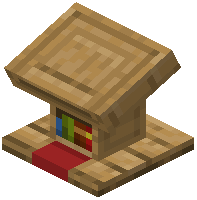 Lectern with Walker Remote` block for Let it Walk! Walkers. Together they let you bind to a walker's `Pilot Controls` and drive the machine from a distance without sitting on board.
Walker Remote Control` item and the `Lectern with Walker Remote` block for Let it Walk! Walkers. Together they let you bind to a walker's `Pilot Controls` and drive the machine from a distance without sitting on board.How do I get the Walker Remote Control in Survival mode?
The mod comes with one crafting recipe for the `Walker Remote Control` item so you can craft it directly during normal Survival gameplay. Open a vanilla crafting table and check your recipe book or an in-game recipe viewer to see the exact ingredient layout before crafting.
Walker Remote Control` item so you can craft it directly during normal Survival gameplay. Open a vanilla crafting table and check your recipe book or an in-game recipe viewer to see the exact ingredient layout before crafting.How do I bind the Walker Remote Control to my walker?
Hold the `Walker Remote Control` in your hand, walk up to your Let it Walk! walker, and right-click its `Pilot Controls` once to link them. Test the link from a short, clear distance right afterward so you confirm the remote is bound before moving farther away.
Walker Remote Control` in your hand, walk up to your Let it Walk! walker, and right-click its `Pilot Controls` once to link them. Test the link from a short, clear distance right afterward so you confirm the remote is bound before moving farther away.Do I still need to sit on board my walker to drive it?
No, once the `Walker Remote Control` is bound to your walker's `Pilot Controls`, you can drive the walker from far away while standing safely on the ground, a watchtower, or another platform. Keep a clear line of sight so you can watch terrain and obstacles ahead of the walker.
Walker Remote Control` is bound to your walker's `Pilot Controls`, you can drive the walker from far away while standing safely on the ground, a watchtower, or another platform. Keep a clear line of sight so you can watch terrain and obstacles ahead of the walker.See all 10 Let It Walk Remote Control questions ›
Related mods
Other wikis you may find useful.