
Super Simple Voice Radio FAQ
19 questions players actually ask, answered.
How do I craft a  radio?
Refer to your mod's recipe guide or JEI/NEI for the exact crafting recipe. Once crafted, place the radio in your Curios slot, hotbar, or inventory to begin using it.
radio in your Curios slot, hotbar, or inventory to begin using it.What's the default key to talk on the radio?
The default push-to-talk keybind is Grave (the backtick key, usually top-left of your keyboard). Hold it down to transmit your voice on your current frequency.
How do I change my radio frequency?
Press the frequency configuration key (default: C) to open the frequency menu, then enter or select your desired frequency. All players on the same frequency can hear each other.
Can I use the radio if it's in my inventory instead of my hotbar?
Yes, the mod automatically detects the radio in your Curios slot, hotbar, or inventory, so you don't need to hold it in your hand to transmit or receive.
radio in your Curios slot, hotbar, or inventory, so you don't need to hold it in your hand to transmit or receive.Do I need Simple Voice Chat installed for this mod to work?
Yes, Super Simple Voice Radio Mod is an addon for Simple Voice Chat and requires it to function. Install both mods for the radio to work properly.
Radio Mod is an addon for Simple Voice Chat and requires it to function. Install both mods for the radio to work properly.Why can't my friend hear me on the radio?
Check that you're both on the same frequency, that Simple Voice Chat is working, and that you're holding down the push-to-talk key. See the Troubleshoot Radio Not Working guide for more steps.
Radio Not Working guide for more steps.Can I customize the keybinds for push-to-talk and frequency changes?
Yes, both keybinds are customizable in your controls settings. See the Customize Your Radio Keybinds guide for detailed instructions.
Radio Keybinds guide for detailed instructions.Does the radio work across different dimensions?
Yes, the radio transmits over configurable frequencies regardless of dimension, allowing you to stay connected with teammates across your entire world.
radio transmits over configurable frequencies regardless of dimension, allowing you to stay connected with teammates across your entire world.What does the Super Simple Voice Radio mod do?
It is a handheld radio addon for the Simple Voice Chat mod that lets you transmit voice over configurable frequencies. It was originally developed for the Dimensional Ascension modpack.
radio addon for the Simple Voice Chat mod that lets you transmit voice over configurable frequencies. It was originally developed for the Dimensional Ascension modpack.What items and blocks does Super Simple Voice Radio add?
It registers 21 items and blocks , including the radio ,  walkie talkie ,
  spuddie talkie , antenna ,
  copper wire , insulator , microphone , speaker , frequencer ,
 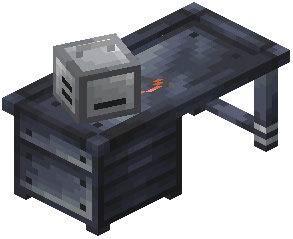 radiosmithing station , and various modules such as iron, gold, diamond, netherite, listener, receiving, transmitting, and speaker modules.
walkie talkie , spuddie talkie , antenna , copper wire , insulator , microphone , speaker , frequencer , radiosmithing station , and various modules such as iron, gold, diamond, netherite, listener, receiving, transmitting, and speaker modules.Which Minecraft versions does Super Simple Voice Radio support?
The Modrinth project page lists Minecraft 1.19.2.
What mods does Super Simple Voice Radio require?
It requires the Simple Voice Chat mod and the Curios API to work.
How do I use the radio in Super Simple Voice Radio?
Hold the radio in your hand and hold right click, or use the keybind (default Grave) to speak over a radio 's frequency. The keybind looks for the first radio in your Curios inventory, then your hotbar, then your inventory, from left to right, top to bottom.
radio in your hand and hold right click, or use the keybind (default Grave) to speak over a radio 's frequency. The keybind looks for the first radio in your Curios inventory, then your hotbar, then your inventory, from left to right, top to bottom.How do I change the radio frequency?
Hold the radio in your hand and use the configure radio keybind, which defaults to C.
radio in your hand and use the configure radio keybind, which defaults to C.What are the default keybinds for Super Simple Voice Radio?
Push-to-talk defaults to Grave, and frequency configuration defaults to C.
Does Super Simple Voice Radio have Curios support?
Yes, it supports Curios. The keybind will search your Curios inventory first, then your hotbar, then your inventory.
Is there a more updated radio mod than Super Simple Voice Radio?
The author points to CodinGlitch's Simple Radio for 1.20.X+ as an updated or more feature-complete alternative.
Radio for 1.20.X+ as an updated or more feature-complete alternative.