
Merchant Guild Ledger FAQ
10 questions players actually ask, answered.
How do I turn a villager into a shopkeeper?
Place a 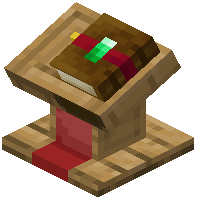 Merchant Counter block within a few blocks of an unemployed villager. The villager will automatically claim it as their job site and become a shopkeeper. You can then right-click the counter to open the owner menu and set up your trades.
Merchant Counter block within a few blocks of an unemployed villager. The villager will automatically claim it as their job site and become a shopkeeper. You can then right-click the counter to open the owner menu and set up your trades.Can I use items other than emeralds as currency?
Yes, the mod supports any item as currency. When setting up a trade, simply choose whatever item you want customers to pay with—diamonds, gold ingots, custom items, or anything else in your inventory.
What happens to items when someone buys from my shop?
Items are physically removed from the counter's inventory when sold, and the payment currency is deposited directly into the counter's storage. This means your stock is real and limited—you need to restock manually when items run out.
How much storage can I add to a shop counter?
Each Chest upgrade adds 27 inventory slots, and you can add multiple chests to a single counter for up to 216 total storage slots. Insert chest items into the Upgrades tab to expand your shop's capacity.
How do I stop my shopkeeper from walking away?
Use the Prismarine or Amethyst Shard upgrades to restrict the villager's movement, keeping them anchored behind the counter. Insert these items into the Upgrades tab to activate the restriction.
Can multiple people manage the same shop?
Yes, use the Gold Block upgrade to unlock co-owner permissions. Once activated, you can grant other players access to modify trades and manage the shop's inventory through the owner menu.
How do I protect my shop from explosions or damage?
Add the Obsidian upgrade to give your counter block full blast resistance against explosions, and use the Nether Star upgrade to make your shopkeeper invincible to all damage. Insert these into the Upgrades tab.
What does the Lightning Rod upgrade do?
The Lightning Rod sends you alerts when your shop's stock runs out or storage fills up, so you know when to restock or empty the payment inventory.
Can I copy my shop settings to another counter?
Yes, use the Bookshelf upgrade to export your counter's settings to a signed book. You can then use that book to quickly copy the same trades and configuration to other shops.
How many trades can I set up on one counter?
By default you get one trade slot, but each Emerald Block upgrade adds an extra trade slot, allowing up to 8 total trades per counter. Insert emerald blocks into the Upgrades tab to unlock additional slots.