

 DownloadVisible Ores Plus Resource Pack
Get the files on 9Minecraft
Visible Ores Plus changes the textures of ore blocks so they stand out against stone, deepslate, and netherrack. The goal is simple: you should be able to notice valuable blocks at a glance instead of scanning every wall.
What Actually Changes
Each supported ore gets a brighter, higher-contrast texture. Coal, iron, gold, redstone, lapis, diamond, emerald, nether quartz, nether gold, and 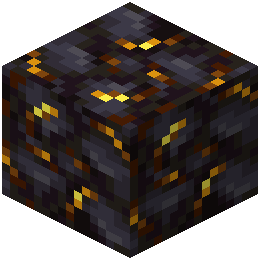 gilded blackstone all read differently from their surrounding blocks. Because this is a resource pack and not a mod with new blocks, you do not craft or place anything — you just mine like normal and let the new textures do the work.
Mining Routine That Benefits Most
- Strip mine with your head at eye level and sweep your view left to right as you walk. The recolored ore faces catch light differently than plain stone.
- In the Deepslate layer, watch for the ore texture sitting on the darker deepslate background — the contrast is the whole point.
- In the Nether, quartz and nether gold are the ones you will pass most often. Glance at ceilings and floors, not just walls, since nether ores generate on all surfaces.
- Bring a light source. The pack brightens ore textures, but unlit tunnels still hide everything.
If you are used to vanilla textures, give yourself a few minutes to relearn what each ore looks like. The shapes are the same; only the coloring and shading are pushed for visibility.