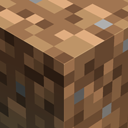
DownloadAether Regenerated Resource Pack
Get the files on 9Minecraft
Understanding Addon Texture Coverage
Aether Regenerated includes matching textures for several popular Aether addons. Before installing addons, you can check which ones have texture support built into this pack.
Supported Addons
The pack includes custom textures for:
- Aether II
- Aether: Lost Content
- The Aether: Redux
- Aether: Emissivity
- Aether Treasure Reforging
- Aether: Overworld Ores
- Deep Aether
- Aether Crossbows
How to See the Textures
1. Install both this resource pack and your chosen addon mod
2. Load the resource pack in your resource packs menu
3. Launch a world with the addon enabled
4. Explore or creative mode to find blocks and items from that addon
5. The textures will automatically apply if the pack supports that addon
If you're planning to use multiple Aether addons, this pack ensures they all share a cohesive visual style rather than clashing with mismatched textures.
More guides for this mod
Enable the Vanilla Shaped Tools OptionMake Aether Berry Bushes Match Vanilla Sweet Berry BushesSwitch Icestone to Blue Color Variant