

Why do all my blocks still look like normal vanilla Minecraft?
Even though it is loaded as a mod, you still need to manually turn on the visuals in your game settings. Open the Options menu, go to Resource Packs, and move The Backrooms Model into your active packs list.
How do I find or craft the new Backrooms blocks?
This mod does not add new custom block IDs to the crafting table or creative tabs. Instead, it replaces the 3D models and textures of over 350 existing vanilla items and blocks, such as 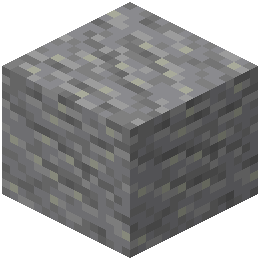 Andesite, Bookshelves, and Brewing Stands.
Does this mod automatically generate a Backrooms dimension or maze?
No, it does not alter world generation or add new dimensions. It is a visual overhaul that transforms standard blocks so you can build your own eerie, liminal hallways and spooky rooms.
What blocks should I use to build basic liminal hallways?
Common building materials like Andesite have been completely retextured specifically to fit liminal hallway construction. You can also experiment with altered Concrete, 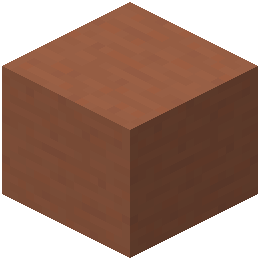 Terracotta, Wool, and Planks to see which textures best fit your maze design.
Andesite have been completely retextured specifically to fit liminal hallway construction. You can also experiment with altered Concrete, Terracotta, Wool, and Planks to see which textures best fit your maze design.How do I see the dynamic model changes on the  Brewing Stand?
Place a Brewing Stand down in the world to view its new mechanical 3D model, then open its interface and insert water bottles. The model will dynamically update its physical slots to show the bottles inside.
Brewing Stand down in the world to view its new mechanical 3D model, then open its interface and insert water bottles. The model will dynamically update its physical slots to show the bottles inside.Do functional blocks still work the same way with the new models?
Yes, blocks like the  Beacon,
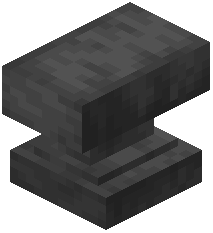 Anvil,
 Bell, and Brewing Stand keep their exact vanilla mechanics and interfaces. Only their outward 3D appearance and textures are changed to fit the unsettling theme.
Beacon, Anvil, Bell, and Brewing Stand keep their exact vanilla mechanics and interfaces. Only their outward 3D appearance and textures are changed to fit the unsettling theme.How do the custom plant models work for  Bamboo and Big Dripleaf?
When you plant Bamboo, you will see custom models as it grows through its different plant stages. If you place a Big Dripleaf and step onto it, the custom model will perform a tilting animation as your character's weight presses it down.
Bamboo, you will see custom models as it grows through its different plant stages. If you place a Big Dripleaf and step onto it, the custom model will perform a tilting animation as your character's weight presses it down.Why aren't the animated block textures moving in my game?
Make sure your game's video settings have terrain and block animations enabled. If you use performance or optimization mods, check their animation settings to ensure animated textures are not toggled off.
What are the best blocks for decorating a dark, spooky room?
Place retextured Bookshelves along the walls and set down Black Candles, Blue Candles, or Brown Candles next to them. You can also incorporate the altered Bell and Beacon models to add strange mechanical or mysterious focal points.
Bell and Beacon models to add strange mechanical or mysterious focal points.Will my friends on a multiplayer server see my Backrooms builds?
Because this mod replaces vanilla block models and textures on the client side, other players will only see the spooky models if they also have the mod installed and activated in their Resource Packs menu. Anyone without it will just see normal vanilla blocks like Andesite and Bamboo.
Andesite and Bamboo.Can I use other resource packs at the same time as this mod?
Yes, you can layer it with other packs, but you must place The Backrooms Model near the top of your active Resource Packs list. Any pack placed above it that alters the same vanilla blocks will override these custom 3D models.
What happens to my world if I remove or deactivate the pack later?
Your world will remain completely safe and nothing will disappear. Because the mod only changes the visuals of standard vanilla blocks, deactivating it simply returns all your placed blocks to their normal vanilla appearances.
Why did my framerate drop after building a large room?
The mod uses over 350 detailed custom 3D models and thousands of unique textures, including animated details. Placing massive quantities of complex 3D models like altered Brewing Stands, Beacons, or custom plants in one chunk can require more rendering power than flat vanilla blocks.
Are wood and foliage blocks changed by this pack?
Yes, several wood types including Acacia, Birch, and Bamboo have altered logs, planks, doors, trapdoors, signs, and leaves. Small plants and flowers like Allium,  Azure Bluet,
 Blue Orchid, and
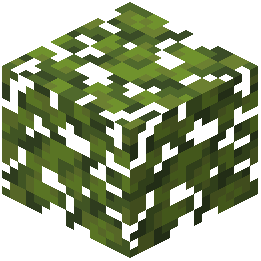 Azalea Leaves also feature new appearances.
Bamboo have altered logs, planks, doors, trapdoors, signs, and leaves. Small plants and flowers like Allium, Azure Bluet, Blue Orchid, and Azalea Leaves also feature new appearances.Do the custom 3D models change how block hitboxes or collisions work?
No, the physical collision boxes of the blocks remain identical to vanilla Minecraft to prevent movement bugs. Even if a custom 3D model looks shape-shifted or smaller than usual, you will still collide with it and interact with it just like the original block.
Does the mod change items in my inventory or just placed blocks?
Along with placed blocks, the overhaul touches over 800 registry entries, which includes various held items, boats, rafts, pottery sherds, and mineral blocks. You will see these texture and model changes both in your inventory and when placed or used in the world.