
Redstone Signal Towers Wiki › Guides › How to Fix 'Nobody Can See My Messages' and Other Phone Problems
How to Fix 'Nobody Can See My Messages' and Other Phone Problems
If you're typing and nothing seems to go through, work through these checks in order. Most problems come from how the mod replaces normal chat.
Quick Checklist
1. Are you using the normal chat key? Normal chat is turned off. Messages must be sent from the Messages tab on a cell phone.
2. Do you have a phone at all? Every player who wants to talk needs to craft their own cell phone.
3. Is there an antenna nearby? Phones need a network to connect to. Place a Copper, Iron, or 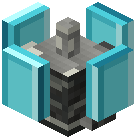 Diamond antenna, then set it up with the
 Screwdriver.
4. Is the antenna configured? An antenna with no name or speed mode chosen won't appear as a usable network. Open it with the Screwdriver and finish the setup.
Connection and Signal Issues
- Check the Networks tab. It shows the networks available near you and their connection strength. If yours isn't listed, you're probably out of range.
- Read the signal indicator. The main phone screen shows your signal level. If it's low, move closer to an antenna.
- Check the connection status. Make sure you're actually connected, not just seeing the network in the list. Select it and connect.
- Joined the wrong network? If several networks share similar names, rename yours with the Screwdriver so it's easy to tell apart.
- Friends far away? Signal fades with distance. Place and link extra antennas between your locations so everyone stays in coverage.