

 DownloadFast Pipes
Get the files on 9Minecraft
Connecting Inventories
Place item pipes between your chests, furnaces, or machines to form a continuous line. Pipes connect automatically when placed adjacent to each other and to inventories. Right-click a pipe with your  Pipe Wrench to see which faces are connected.
Adding an Extractor
To pull items from a source inventory, right-click a pipe face connected to that inventory with an Extractor attachment. Open the Extractor GUI to configure:
- Whitelist/Blacklist filters: Specify which items to pull or exclude
- Routing mode: Choose nearest, furthest, random, or round-robin to decide which destination receives items
- Redstone control: Make the extractor activate only when powered or unpowered
Receiving Items
Attach an Inserter to your destination container and set its priority level. Items will route toward high-priority inserters first. If a container fills up, the Inserter bounces items back into the network safely.
Place a 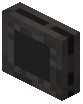 Void attachment at the end of your line to destroy any overflow that has nowhere to go.