
How to Customize Your Backpack Color and Trim
Change the Main Color
Place your backpack and a vanilla dye in a crafting grid together. The backpack will adopt the dye's color as its primary shade. You can use any standard Minecraft dye—from white to black, or vibrant colors like red, blue, or green. Experiment with different dyes to match your aesthetic.
Add Carpet Trim (Medium and Large Only)
If you're using a Medium or 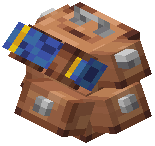 Large backpack, you can add an extra layer of customization. Combine your dyed backpack with colored wool carpet in a crafting grid to add a trim accent. This creates a two-tone look with your main color and a contrasting carpet border.
Mix and Match
You can dye and trim your backpacks multiple times. If you want to change the look later, simply craft with a new dye or carpet combination. This lets you organize your packs visually—for example, using red for mining supplies and blue for building materials.