
Configuring Simple Tomb to Fit Your Server or World
Why Configure It
Simple Tomb works out of the box, but most players tweak it so graves behave the way they want — for example, whether a key is required, whether graves are protected from other players, and how long a grave sticks around before it despawns. These options live in the mod's config file.
Common Settings to Look For
Open the config (found in your world or server config folder) and look for options such as:
- Whether a
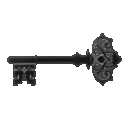 Grave Key is given on death.
 - Whether a key is required to open a grave.
- Whether graves are locked to their owner.
- How long a grave persists before it disappears.
- Whether graves can be broken by other players or explosions.
Applying Changes
Edit the values, save the file, and restart the game or server so the changes take effect. On a server, the config on the server side is what matters — client settings will not override it. Test by dying in a safe spot and checking that the grave behaves as  configured.
Good Defaults for Multiplayer
On a shared server, enabling owner-locking and a reasonable despawn timer prevents both theft and clutter. If you want a hardcore feel, require the key; for a casual feel, let graves open freely.