
Create a Two-Tone Colored Shulker Box
Craft the Dyeing Station
You'll need to build a 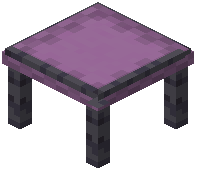 Shulker Dyeing Station first. Gather blackstone and shulker shells, then craft the station at a crafting table. Place it in the world when you're ready to dye.
Dye Your Box
1. Hold your shulker box and interact with the Dyeing Station
2. The UI will show two sections: top half and bottom half
3. Select a dye color for the top half from the available palette
4. Select a different dye color for the bottom half
5. Confirm your color choices
6. Retrieve your newly dyed box
Color Combinations
You can mix any two dyes to create unique two-tone boxes. This is purely cosmetic but helps you organize and identify boxes at a glance. Consider using complementary colors or your base's color scheme.
Redyeing
You can return to the Dyeing Station anytime to change your box's colors. There's no penalty for recoloring, so experiment until you find a look you like.