
Sea Weapons Wiki › Guides › Customize Your Weapons with Cosmetic Skins
Customize Your Weapons with Cosmetic Skins
Accessing the Skin Menu
To change your weapon's appearance, hold the weapon you want to customize and sneak (default: Shift) while right-clicking on a Smithing Table. This opens the skin selection menu without requiring any crafting materials.
Available Skin Styles
The mod includes multiple cosmetic skins for your gear:
- Royal, Coral, Ebonite, and Ruby skins work on your main weapons like the
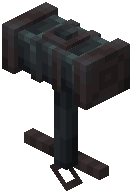 Anchor Hammer and
  Nautilus Longsword
 - Abyssal skin is specifically designed for the Nautilus Longsword, giving it a dark ocean aesthetic
- Sculk and Golden Chain skins customize the appearance of the
 Ancient Vine
Applying Skins
Select your desired skin from the menu. The change applies immediately to your weapon. Skins are purely cosmetic and don't affect weapon stats, damage, or enchantments—they're purely for visual customization.
Switching Between Skins
You can change skins as often as you want by returning to the Smithing Table. Experiment with different combinations to match your playstyle or aesthetic preferences.