
Set Up Your First Shop
Place and Claim the Counter
Find an unemployed villager and place a 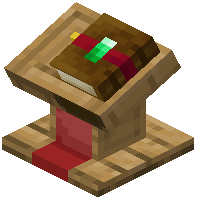 Merchant Counter block within a few blocks of them. The villager will automatically claim it as their job site, transforming into a shopkeeper. You'll know it worked when the villager adopts the merchant profession.
Configure Your Trades
Right-click the Merchant Counter to open the owner menu. You'll see tabs for inventory management and trade setup. Click on an empty trade slot to define what you're selling and what currency you want in return. You can use any item as payment—emeralds, diamonds, custom materials, or even blocks.
Stock Your Shop
Place the items you want to sell into the counter's inventory tab. These are the physical goods customers will purchase. Make sure you have enough stock before opening for business.
Let Customers Trade
Once configured, other players can right-click the villager to see your custom trades. They'll exchange their payment items for your stock. Sold items leave the counter automatically, and payments deposit into your inventory for you to collect later.