

Where do I put Comprogrammer Model in my load order?
Open your Resource Packs menu and activate Comprogrammer Model directly above the default Minecraft Programmer Art pack. This ensures the modded textures override modern styles while blending with classic base-game visuals.
Why are my modded items still showing modern textures instead of retro ones?
Check your Resource Packs menu to make sure Comprogrammer Model is activated and placed at the top of the active column, above default Programmer Art. If you haven't installed one of the over 180 supported mods, you will only see changes to base items included in the pack, such as boats, dyes, and spears.
Do I need to install Blockbench for this pack to work?
No, Blockbench is not required for regular gameplay. You only need Blockbench if you plan to open and edit the 8 custom source models included inside the pack's files.
Which mods are supported by Comprogrammer Model?
The pack restyles content across more than 180 popular mods, supplying nearly 25,000 textures and 460 custom 3D models. Major supported mods include Farmer’s Delight, Alex’s Caves, Spelunkery, Supplementaries, and Born in Chaos.
How do I get the candy cane poles to connect to other blocks?
Place a decorative `candy_cane_pole` directly next to adjacent blocks on its north, south, east, or west sides. The custom 3D model will automatically update to show physical connections to those neighboring blocks.
How can I see the attached straps on backpacks and containers?
Equip or place down supported container items like the `bamboo_basket`, `cardboard_box`, or `piglin_pack`. The custom 3D models for these containers include visible attached straps.
Why do the lollipop bunches look different from each other?
The pack includes multiple `lollipop_bunch` variations that apply to sweet treats from supported mods. In addition to different visual styles, these treats feature animated retro textures.
Which items have custom 3D models instead of flat textures?
There are 460 unique 3D models across supported mods designed to match classic blocky shapes. You can see these custom shapes by inspecting specialized items like the `heart_of_iron`, placing down a `mini_chest`, or equipping containers like the `bamboo_basket`.
Does this pack change vanilla Minecraft items and blocks too?
Yes, in addition to modded content, it alters specific items and blocks like Glass, Sand,  Monster Spawner,
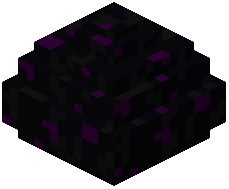 Dragon Egg,
 Nether Wart, and
 Weeping Vines. It also covers all wood boat and raft variants (including Poplar and Pale Oak), various dyes, cod items, and spears.
Monster Spawner, Dragon Egg, Nether Wart, and Weeping Vines. It also covers all wood boat and raft variants (including Poplar and Pale Oak), various dyes, cod items, and spears.Does Comprogrammer Model work on multiplayer servers?
Because its visual changes are applied through the Resource Packs menu, it functions purely on the client side. You can use it on any server to see retro textures and 3D models for installed mods without the server needing the visual pack.
What should I do if the animated textures on items aren't moving?
Verify in your video settings that terrain and item animations are turned on. Once enabled, select items like the `lollipop_bunch` and specific environmental elements will display their moving retro details.
Can I use Comprogrammer Model without having all 180 supported mods installed?
Yes, the pack works with any combination of the supported mods you have in your world. It will automatically apply its textures and 3D models only to the mods you currently have active.