

 DownloadMagic Brooms
Get the files on 9Minecraft
Setting Up the Assembly Bench
Place a 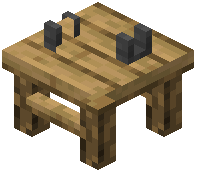 Broom Assembly Bench in your base. This is where all broom crafting happens—you'll watch your creation assemble piece by piece rather than using a standard crafting grid.
Building Your Broom
1. Add wood to the bench as your broom's base structure
2. Attach hay to create the bristles
3. Insert a magical catalyst to determine your broom's element (Magic, Fire, Ice, Lightning, Ender, Grove, or Tide)
4. Optionally add an upgrade component to enhance performance
5. Watch as the finished broom materializes and floats toward you
First Flight
Equip the broom from your inventory and mount it like a horse. Use standard movement controls to accelerate, and look up or down to change altitude. The broom responds to your input with momentum and banking animations, creating a more immersive flying experience than Creative mode flight.
Each elemental type handles slightly differently, so experiment to find your preferred flying style.