

 DownloadGlobal Xp
Get the files on 9Minecraft
How do I make an xp bank?
Place an emerald in the center of a crafting table and surround it with eight iron bars. Once crafted, place the XP Bank block anywhere in the world and it's ready to use.
How do I put xp into the xp bank?
Make sure your hands are empty, then hold the Sneak key and right-click the XP Bank block. This will deposit all of your current experience into the block at once.
How do I take xp out of the xp bank?
With an empty hand, simply right-click the XP Bank block. By default, this withdraws one level of experience at a time.
Can I change how much xp I withdraw at once?
Yes, you can configure whether the block withdraws one level or all stored XP per right-click by adjusting the settings in the mod's configuration file.
Does the xp bank pick up experience orbs automatically?
Yes, the XP Bank automatically collects nearby experience orbs within a configurable radius. You can disable this by giving the block a redstone signal.
What happens to my xp if I break the xp bank?
All stored XP is kept safe when the block is broken and moved—you won't lose any experience.
Can multiple players use the same xp bank?
Yes, the XP Bank works as a shared resource that any player can deposit to or withdraw from.
Can I rename my xp bank?
Yes, you can use an anvil to give the XP Bank a custom name, which will display above the block.
How do I see how much xp is stored?
Look at the XP Bank block and a floating text display will appear above it showing the stored amount. If you have tooltip mods like Jade or Waila installed, they will also show detailed information.
Can I set a tax or fee on xp withdrawals?
Yes, you can configure an XP tax by setting a percentage in the mod settings—the block will return only that percentage of the stored XP when you withdraw.
What does the Global Xp Mod do?
It adds a block that stores experience points, and any player can deposit or withdraw XP from it. Stored XP stays safe even if the block is broken and moved.
What block does Global Xp add?
It adds one block , the 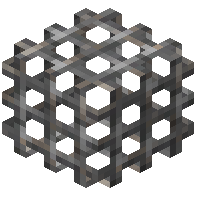 XP Block (also called the XP Bank), which stores XP and can be accessed by all players. In the Creative Menu it appears under the Miscellaneous tab.
How do I craft the XP Block in Global Xp?
Place one emerald in the center of a crafting table and surround it with eight iron bars.
How do I deposit XP into the XP Block?
Sneak and right-click the block with an empty hand to add all of your current experience. Your offhand must be empty too.
How do I withdraw XP from the XP Block?
Right-click the block with an empty hand to remove one level and add it to your experience bar.
Does the XP Block keep its stored XP when broken?
Yes, the block retains the stored XP when it is broken, and the item in your inventory shows the stored amount in its tooltip.
How do I stop the XP Block from picking up XP orbs?
Give the block a redstone signal to disable orb pickup. You can also turn pickup off in the config.
What Minecraft versions and mod loaders does Global Xp support?
It runs on Fabric, Forge, NeoForge and Quilt. The listed Minecraft versions are 1.21.10, 1.21.11, 26.1.1, 26.1.2, 26.2 and 26.3.
Can I rename the XP Block?
Yes, renaming the block with an anvil gives it a custom name, which shows above the block when you look at it.
Does Global Xp work with Jade or Waila?
Yes, the block supports Waila, HWYLA, Jade, WTHIT and TheOneProbe. Their tooltips show a level approximation and, when sneaking, the exact XP stored.