

 DownloadFarmers Delight Refabricated
Get the files on 9Minecraft
Setting Up the 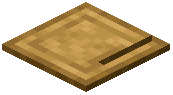 Cutting Board
Place a Cutting Board on any solid block. Right-click it with a knife to open its interface, or right-click with the item you want to process. The board holds one item at a time and shows the result of cutting. You can also place the board and simply right-click ingredients onto it to prep them.
Cutting Ingredients
Hold a knife and right-click the board to chop. Different items yield different outputs — vegetables become slices or pieces, meat becomes cuts, and some blocks become craftable parts. The knife has durability and will wear down with use, so carry a spare or repair it. If a recipe needs a specific cut, the board is the only place to get it.
Why It Matters
Many  cooking pot recipes require pre-cut ingredients. Without a cutting board you cannot make certain meals, sandwiches, or patties. The board is also used to obtain some intermediate items that have no other source.
Tips
- Keep a knife in your hotbar whenever you cook.
- Some recipes output multiple pieces from one input, so cutting is efficient.
- The board can be placed on walls or floors; orientation does not affect function.
- If right-clicking does nothing, check that you are holding the correct tool or item.